
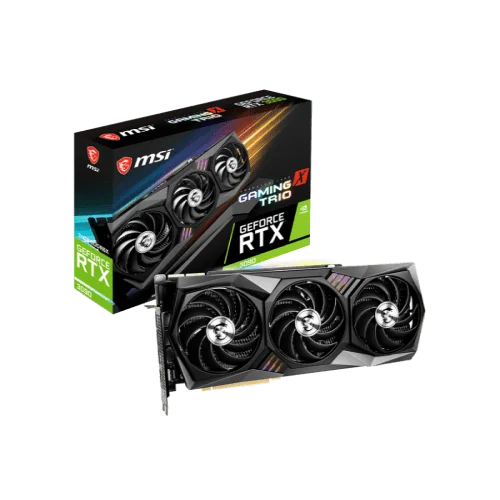
MSI GEFORCE RTX 3090 GAMING X TRIO 24GB GRAPHICS CARD
Out Of Stock
MSI GEFORCE RTX 3090 GAMING X TRIO 24GB GRAPHICS CARD
- Stock: Out Of Stock
- Model: Model-6756
- Product id: 18215
- • Memory 24GB GDDR6x • Cores: 10496 • NVIDIA G-SYNC and HDCP • Interface PCI Express x16 4.0
Chat Through
Quick Compare
| Product Details | ||||
| Product | MSI GEFORCE RTX 3090 GAMING X TRIO 24GB GRAPHICS CARD | Gigabyte GT 710 2GB DDR3 Graphics Card | OCPC GeForce GT 730 4GB DDR3 Graphics Card | Colorful GeForce GTX 1630 Mini 4GD6-V GDDR6 Graphics Card |
| Image |  |
 |
 |
 |
| Price | |
|
|
|
| Model | Model-6756 | GV-N710D3-2GL | GT 730 | GeForce GTX 1630 Mini 4GD6-V |
| Brand | MSI | GIGABYTE | OCPC | COLORFUL |
| Availability | Out Of Stock | In Stock | In Stock | In Stock |
| Rating | Based on 0 reviews. |
Based on 0 reviews. |
Based on 2 reviews. |
Based on 1 reviews. |
| Summary | MSI GEFORCE RTX 3090 GAMING X TRIO 24GB RTX 3090 GAMING X is a big ferocious GPU (BFGPU) with TITAN class performance. It's powered by Ampere—NVIDIA's 2nd gen RTX architecture—doubling down on ray tracing and AI performance with enhanced RT Cores, Tensor Cores, and new streaming multiprocessors. Plus, it features a staggering 24 GB of G6X memory, all to deliver the ultimate gaming experience. MSI GEFORCE RTX 3090 latest iteration of MSI’s iconic GAMING series once again brings performance, low-noise efficiency, and aesthetics that hardcore gamers have come to recognize and trust. Now you too can enjoy all your favorite games with a powerful graphics card that stays cool and silent. Just the way you like it. It’s time to put on team colors. Synchronize lighting with other compatible devices to take the light show to another level. Going dark is as easy as turning the lights off. MSI GEFORCE RTX 3090 TRI FROZR 2 thermal system has been designed for efficiency. Expect a perfect balance of cool and quiet for more fun during endless gaming sessions. TORX FAN 4.0 is built on teamwork, with pairs of fan blades bound together with a linked outer ring design that focuses airflow into the updated TRI FROZR 2 cooling system. Core Pipes are precision-machined for maximum contact over the GPU and spread the heat along the full length of the heatsink for optimal cooling. GAMING has been crafted to serve you well during intense gameplay. MSI GEFORCE RTX 3090 legendary item has extra power unlocked through the Custom PCB. Additional fuses built into the custom PCB provide additional safeguards against electrical damage. An enhanced PCB material design with 2oz thickened copper increases conductivity, improving heat dissipation, and high-performance reliability. Solid build quality in key areas is strengthened with a rigid metal anti-bending strap. A bundled support bracket can be attached to your PC case for additional graphics card reinforcement. MSI's exclusive Dragon Center software helps you get the most out of your MSI products. Monitor, tweak, and optimize in real-time with just a few clicks. MSI GEFORCE RTX 3090 GAMING X TRIO 24GB GRAPHICS CARD Review There are only two key differences on the spec sheet (well, aside from the price) compared to the Founders Edition. First up: The GPU clock speed. While Nvidia’s card comes clocked at the 1,700MHz reference spec for the RTX 3090, MSI bumps it up to 1,785MHz on the Gaming X Trio. That doesn’t tell the whole story though. The way Nvidia’s boost clock algorithms work, they’ll increase speed as much as thermal headroom and fan profiles allow. In practice, during a 5-lap run in F1 2020, we saw the Nvidia Founders Edition deliver consistent clock speeds of 1,785MHz to 1,815MHz. The Gaming X Trio, on the other hand, fluctuated clock speeds with much more variance. We saw speeds between 1,740MHz and 1,935MHz in the same GPU-focused benchmark, most often falling in the mid-1,800s. The wild variance likely explains why we see varied results versus the Founders Edition in our gaming benchmarks later. MSI GEFORCE RTX 3090 also uses a different power delivery system. While Nvidia’s radical cooler uses a just-as-radical proprietary 12-pin connection that requires the use of an (ugly) adapter with a pair of 8-pin power connectors, the Gaming X Trio sticks to a trio of standard 8-pin power connectors. That theoretically gives the card more overclocking headroom, and lets it reduce power demands on your motherboard’s PCIe connection. Nvidia recommends using a 750W power supply with its GeForce RTX 3090, but at the time of publication, MSI didn’t provide PSU guidance for its card. MSI GEFORCE RTX 3090 real difference lies in the cooler, though. Nvidia expanded the RTX 3080’s dual-slot Founders Edition cooler to fill three slots with the RTX 3090, but MSI slapped the same massive triple-slot “Tri Frozr 2” cooler on both versions of the Gaming X Trio. It kicks ass though, running cool and quiet. MSI GEFORCE RTX 3090 threw a ton of custom engineering into the Gaming X Trio’s design, and you can read all about it in our RTX 3080 Gaming X Trio review. The gargantuan cooler drops a trio (hence the name) of MSI’s Torx 4.0 axial fans atop a fat heatsink bristling with metal fins and five full-length heatpipes. This is a big card, so to help it stand robust, MSI reinforced its design with additional metal straps, a graphene-infused backplate that’s both stronger and dissipates more heat than plastic alone, and an optional support bracket bundled in the box. MSI also packed extra fuses onto the board for power protection and enhanced the PCB with copper to help with heat dissipation and reliability. This is a significant custom cooler. Again, go read our review of the RTX 3080 Gaming X Trio for a much deeper dive into the tech under the shroud. We didn’t get into it much with the RTX 3080 version, but since we’re talking about a nearly $1,600 graphics card now, I wish MSI opted for a metal shroud rather than the plastic this card uses, just to make it feel a bit more premium. That would have added even more weight, though. Speaking of the shroud, you know this card comes with RGB LEDs. The Gaming X Trio includes a thin RGB light strip on the edge of the card, accent lights around the fans in the shroud, and the MSI logo on the side of the card also illuminates. You can tweak them using MSI’s “Mystic Light” RGB controls via the company’s Dragon Center control app, and tweak your card’s performance using MSI’s fantastic Afterburner overclocking and GPU monitoring app, which remains a go-to for enthusiasts. Specification: Graphics Chipset Nvidia GeForce® RTX 3090 CUDA Cores (Nvidia) 10496 Memory Type GDDR6X Core Clock Boost:1785 MHz Memory Bandwidth (GB/sec) 19.5 Gbps Memory Size 24GB Memory Bus (Bit) 384-bit Recommended PowerSupply 750W Power Consumption 370W Resolution 7680x4320 Interface (PCI Express) PCI Express 4.0 Power Connector (Pin) 3 x 8-pin DirectX DirectX 12 Ultimate Ports DisplayPort x 3 (v1.4a) +HDMI 2.1 x 1 Multi Display Up to 4 Displays OpenGL OpenGL®4.6 Dimensions 335 x 140 x 56mm Warranty 2 Year Warranty .. | Gigabyte GT 710 2GBGigabyte GT 710 2GB DDR3 Graphics Card Gigabyte GT 710 2GB DDR3 Graphics Card Powered by NVIDIA GeForce GT 710 GPU Integrated with the first 2048MB DDR3 memory and 64-bit memory interface Core Clock: 954MHz Features Dual-link DVI-D / D-Sub / HDMI Support PCI Express 2.0 x8 bus interface Recommended system power supply requirement: 300W Gigabyte GT 710 2GB DDR3 Review Gigabyte GT 710 easy to physically install. Gigabyte GT 710 instructions failed to mention the BIOS. My monitor did not work at first because when I booted, it was plugged into the new card. I pressed "delete" a few times hoping the computer would open BIOS so i could shut down, plug back into the onboard video card and then enter BIOS to disable the onboard video, and default to the PCIe slot. Once I did that, we were in business. Someone who is not familiar with BIOS might suspect the card does not work...don't forget to change your BIOS when you use onboard video card BEFORE you install the card. Once I got past that hiccup, it was fine. What i do NOT like is these companies now send a card without a CD or installation software and drivers. Not everyone has internet these days Yes hard to believe, But i purchased this for someone who has a home desktop computer, when i installed the card i was stunned that there were NO drivers or installation disk in the box. Companies are getting so cheap. I had to drive home over 40 miles D/L the software place it on a CD drive back to install the software for the card to run. Totally ridiculous. Gigabyte GT 710 card on the other hand works great now that i have it installed., Make sure you install the software that comes with the video card. The windows default software technically works... but it is no good. Use the included software and then check for updates to assure you have the video card running at its best. Installation of software and drivers took forever. Once installed ran machine for about an hour. Next use was online gaming where this crashed and sent me to a black screen after only 10 minutes of online online multiplayer gaming. It has been returned and my older BFG 550 Ti is back in running like a champ. Specification: Graphics Card Memory Size 2 GB Graphics Engine GeForce® GT 710 Core Clock 954 MHz (Standard: 954 MHz) Memory Type DDR3 Card size H=21 L=144 W=68 mm Memory Clock v2.0 1600 MHz II v1.0 1800 MHz II Warranty 2 Years .. | OCPC GeForce GT 730 4GB DDR3 Graphics CardThe OCPC GeForce GT 730 4GB DDR3 Graphics Card is an excellent entry-level GPU designed for everyday computing, multimedia, and light gaming. Featuring 4GB DDR3 memory, it ensures smooth video playback, reliable performance, and support for popular applications. With HDMI, DVI, and VGA outputs, it offers wide compatibility with different monitors and systems. Its compact design makes it ideal for small form factor PCs, while low power consumption ensures efficiency without requiring an external power connector. Perfect for office work, casual gaming, and HD video streaming, the GT 730 is a budget-friendly upgrade for enhanced graphics performance.Main Features of OCPC GeForce GT 7304GB DDR3 memory for reliable performanceHDMI, DVI, and VGA outputs for multi-display supportCompact design suitable for small casesLow power consumption, no extra connector requiredIdeal for everyday tasks and HD video playbackCompatible with major operating systemsSupports DirectX and OpenGL technologiesFeatures and BenefitsSmooth Visuals: 4GB memory ensures better multitasking and video playback.Connectivity Options: HDMI, DVI, and VGA support multiple monitors.Compact Build: Fits easily in small desktops and office PCs.Energy Efficient: Runs without external power, saving energy.Budget-Friendly: Affordable choice for entry-level users.HD Ready: Handles high-definition videos with ease.Reliable Brand: Backed by OCPC’s trusted quality.Why Choose OCPC GeForce GT 730?The OCPC GeForce GT 730 4GB DDR3 Graphics Card is the perfect balance of affordability, reliability, and performance for office use, multimedia, and light gaming.Why Buy from Creatus Computer?Creatus Computer guarantees genuine products, best prices in Bangladesh, warranty support, and excellent after-sales service for every customer.FAQQ1: Can the GT 730 run modern games?A1: It can handle light and older games but is not designed for heavy gaming.Q2: Does it need external power?A2: No, it runs efficiently without additional power connectors.Q3: Is it good for dual monitors?A3: Yes, it supports multiple displays via HDMI, DVI, and VGA... | Colorful GeForce GTX 1630 Mini 4GD6-V GDDR6 Graphics CardThe Colorful GeForce GTX 1630 Mini 4GD6-V is a compact and powerful GDDR6 graphics card that delivers exceptional performance and visuals for gamers and multimedia enthusiasts. This graphics card is designed to fit into small form factor systems while still packing a punch in terms of gaming capabilities. With its compact dimensions of 183x127x39mm, it's perfect for those looking to build a compact gaming PC without sacrificing performance. At the heart of this graphics card is the GDDR6 memory with a 4GB capacity, offering fast and responsive performance for your gaming needs. The 12Gbps memory clock ensures smooth and lag-free gameplay, allowing you to immerse yourself in the latest games with stunning graphics. The 64-bit BUS type and 512 CUDA cores contribute to the card's ability to handle demanding graphics tasks and deliver an exceptional gaming experience. The Colorful GeForce GTX 1630 Mini boasts a core clock with a base speed of 1740MHz, which can boost up to 1785MHz. This means you can enjoy smooth gameplay in your favorite titles without stuttering or frame drops. It supports modern gaming technologies and is ready for the latest DirectX 12.1 and OpenGL 4.6, ensuring compatibility with the latest games and software. In terms of connectivity, the card offers a versatile set of ports and connectors. It features 1x DisplayPort, 1x HDMI, and 1x DL-DVI port, allowing you to connect to a variety of displays and peripherals, making it a versatile solution for your gaming and multimedia needs. Despite its compact size and impressive performance, the Colorful GeForce GTX 1630 Mini is power-efficient, with a recommended PSU of just 400W and a power consumption of 75W. This makes it a suitable choice for smaller PC builds that need to maintain energy efficiency.Colorful GeForce GTX 1630 Mini 4GD6-V Graphics Card FeaturesGDDR6 Memory: The graphics card is equipped with 4GB of GDDR6 memory, providing high-speed and responsive performance for gaming and multimedia tasks.Impressive Clock Speeds: With a base clock of 1740MHz and a boost clock of 1785MHz, this graphics card offers swift and smooth performance, ensuring lag-free gameplay and responsive graphics rendering.High Memory Clock: The card features a memory clock speed of 12Gbps, facilitating rapid data transfer between the GPU and memory for seamless gaming experiences.CUDA Cores: The Colorful GeForce GTX 1630 Mini is equipped with 512 CUDA cores, which are responsible for parallel processing and significantly enhance its ability to handle complex graphics workloads.Versatile Connectivity: It comes with a range of ports and connectors, including 1x DisplayPort (DP), 1x HDMI, and 1x DL-DVI port, allowing you to connect to various display options and peripherals.Compact Form Factor: The card is designed in a compact form factor with dimensions of 183x127x39mm, making it ideal for small form factor PC builds where space is limited.Power Efficiency: It's a power-efficient graphics card with a recommended PSU of just 400W and a power consumption of only 75W, which is great for energy-conscious users and small PC builds.Modern API Support: The Colorful GeForce GTX 1630 Mini supports the latest graphics APIs, including DirectX 12.1 and OpenGL 4.6, ensuring compatibility with the latest games and software.Warranty: Colorful offers a generous 3-year warranty, giving you peace of mind and ensuring the longevity and reliability of your investment in this graphics card.Compact Gaming Power: Despite its small size, this graphics card delivers a powerful gaming experience, making it suitable for gamers who want high-quality graphics without the need for a full-sized GPU.Excellent Price-Performance Ratio: This card provides a cost-effective solution for gamers and content creators looking for a balance between price and performance, making it a great choice for budget-conscious builds... |
Related Product


Recently Viewed
-60x60w.jpg.webp "GIGABYTE C102 GLASS ICE Mid Tower Casing")
