
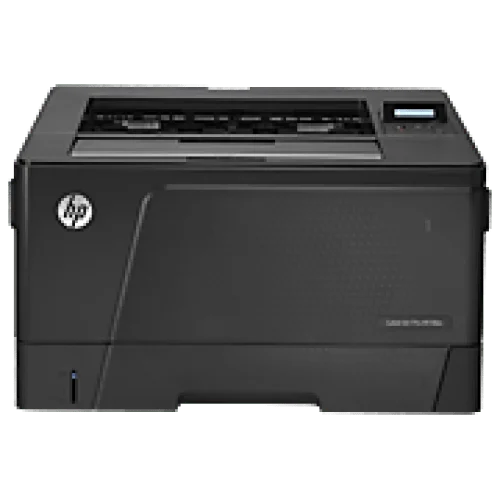
HP LaserJet Pro M706n A3 Printer
Save: 5000৳ (7%)
HP LaserJet Pro M706n A3 Printer
- Stock: In Stock
- Model: M706n
- Product id: 16310
70,000৳
75,000৳
Ex Tax: 70,000৳
- Print Speed: 18 ppm (Black)
- Resolution: 1200x 1200 dpi (Black)
- Connectivity: USB2.0, LAN
Chat Through
Quick Compare
| Product Details | ||||
| Product | HP LaserJet Pro M706n A3 Printer | Epson L1300 ITS Low Cost Printer | RICOH MP 2014D Multifunction Copier | Brother MFC-L5710DW Multifunction Mono Laser Printer |
| Image |  |
 |
 |
 |
| Price | |
|
|
|
| Model | M706n | Model-1169 | RICOH MP 2014D | MFC-L5710DW |
| Brand | Hp | EPSON | BROTHER | |
| Availability | In Stock | In Stock | In Stock | In Stock |
| Rating | Based on 0 reviews. |
Based on 0 reviews. |
Based on 0 reviews. |
Based on 0 reviews. |
| Summary | HP LaserJet Pro M706n A3 Printer HP LaserJet Pro M706n Printer , Print speed black:Up to 18 ppm, Print quality black (best)Up to 1200x 1200dpi quality , Display 2-line LCD (text) , Processor speed: 750 MHz , Memory standard: 256 MB, 1 USB 2.0 device port; 1 Fast Ethernet 10/100 , A4; A3; B4 (JIS); B5 (JIS); A5; 16K, Weight 17 kg , Warranty 1 year. Specification Memory 256 MB Print Speed (Black) Up to 18ppm Print Resolution (Black) Up to 1200 x 1200 dpi quality Paper Sizes A4; A3; B4 (JIS); B5 (JIS); A5; 16K Connectivity 1 USB 2.0 device port; 1 Fast Ethernet 10/100 Warranty 1 Year Warranty .. | Specification General: Brand Epson Model L1300 Functions Print Only Printer Type Single Function Color Ink Tank Printer Part No C11CD81501 Technical Information: Display No Ink Tank Yes Print Performance: Output Color Color Print Speed (Black) 30ppm Print Speed (Color) 17ppm Print Resolution (Pixel) 5760 x 1440dpi Duplex Print Manual Duty Cycle up to (Yield) 30,000 Pages Paper Information: Print Paper Size A3+, A3, B4, A4, A5, A6, B5, 10x15cm (4×6), 13x18cm (5×7 Inch), 16:9 wide size, Letter, Legal, Half Letter (5.5×8.5 Inch), 9x13cm (3.5×5 Inch),13x20cm(5×8 Inch), 20x25cm(8×10 Inch), Envelopes: 10(4.125×9.5 Inch),DL(110x220mm), C4 (229x324mm, C6(114x162mm) Paper Type Plain Paper, Envelopes Input Tray 100 Sheets Output Tray 40 Sheets Physical Description: Body Color Black Dimensions 705 x 215 x 322mm Weight (Kg) 12.2Kg Software: Supported Operating System Windows 7, 8, 8.1, 10, Vista, XP, Mac OS 10.5+ Warranty: Warranty 1 year Connectivity: Interface (Built-in) USB Additional Info: Consumable Dye Based, Epson Genuine Inks: Black-T6641 (7,100 Pages Yield – 2 bottles of black ink), Cyan- T6642 (5,700 Pages Composite Yield), Magenta- T6643 (5,700 Pages Composite Yield), Yellow- T6644 (5,700 Pages Composite Yield) Power Source/ Power Consumption AC 220 – 240V Specialty With the L1300, you have the option to print larger documents up to A3+ size. This opens up possibilities for superior presentations of detailed CAD drawings, floor plans, business reports and charts. High-capacity integrated ink tanks and highly affordable genuine ink bottles. With a bundled starter kit of 5 bottles of Epson Ink, the L1300 yields up to 7,100 pages. Designed for continuous printing performance, Epson’s renowned Micro Piezo™ printhead is not only highly reliable in operation, it also delivers an astoundingly high resolution of 5760dpi. When paired with genuine Epson formulated inks, the L1300 delivers exceptionally high-quality prints for all your business and creative needs. Epson L1300 ITS Low Cost Printer Epson L1300 ITS Low Cost Printer compact 4-colour A3+ printer for cost-conscious users, the L1300 is built around a high-capacity ink tank system that stretches to 7,500 black pages without a refill1. With minimal intervention, the L1300 delivers cost-effective and hassle-free printing of advertising materials, CAD drawings, graphics and reports, perfect for corporate office, retail and education environments. Ultra-low-cost printing Take advantage of ultra-low cost printing, up to A3+ size, for all kinds of documents with this 4-colour ink tank system printer. Ultra-low cost printing An integrated ultra-high-capacity ink tank system makes the L1300 perfect for heavy use where achieving the lowest cost per page is all important. Ideal for small offices needing to produce lengthy reports, advertising materials or CAD drawings, the L1300 comes with five 70ml ink bottles. Increases productivity The L1300's integrated ink tank system makes it refill-free for up to 7,500 pages in black and 6,500 pages in colour. When it's finally time for a change, there's no need for mess; with fast ink top-up technology, clear labelling and a drip-free nozzle, to refill the L1300 is a simple, quick and clean process. Reliable results With a purpose-built ink tank, there's no need to risk costly downtime or poor quality print-outs that can result from using third-party ink tank systems. Fully integrated into the printer, the L1300's continuous ink ensures trouble-free mono and colour printing in up to A3+. Fast business printing Inside the L1300 is Epson's Micro Piezo technology and genuine Epson ink, which together deliver quality print-outs. It benefits from print speeds of up to 17 pages per minute (ppm) in colour and 30 ppm in black, and ISO print speeds of 5.5 ppm in colour and 15 ppm in black. Key Features Value for money: Ultra-low-cost per page Peace of mind: Covered by Epson's warranty Epson quality: Purpose-built, refillable ink tank A3+ printing: Epson's first A3+ 4-colour ITS printer User-friendly: Hassle-free with simple set-up How to Maintain Printers? Anytime you need to open a printer to maintain, turn off its power and keep your hands away from hot fusers and moving parts within the printer. It will check the unnecessary damage to both you as well as your printer. Here are some maintenance tips that can help you take optimum care of your computer: - Stay Safe Each time you require opening the computer for maintenance, turn off its power. Keep your hands away from hot fusers and moving within the printer. It will ensure that neither you or your printer suffer from any type of damage. Clean Dust and Debris from The Printer The build-up of toner, dust and other debris within the printer might lead to jams, causing streaks of ink to appear on papers. A proper fix is to remove particles using a small vacuum. It is preferred over use of canned air dusters since it removes dust instead of spraying it around its interiors. You can still go further by using a cotton swab and pure water to wash and cleanse the ink cartridges. Most of the manufacturers offer specific instructions either in their printer manual or online. Make it a point to read them since there are some parts of the cartridge which you didn’t gauze. Fix Mechanical Errors Carefully Like other peripherals, your printer will last longer if you take its proper care. A mistakenly resolved paper jam might lead to printing problems in the future. Instead of venting your frustration on the printer, use the instructions which come with the printer to find out the best way to fix a jam on your specific model. Usually, the most common practice is to utilise both hands in order to pull out the jammed paper slowly. It will help you ensure that there is no internal damage to the printer. You can also check jams by ensuring that the paper you load within the printer isn’t torn, stuck together and dog eared and that the tray isn’t overfilled. Buy A Maintenance Kit If you are willing to invest a little amount of money to extend your printer’s lifespan, buy a maintenance kit from the printer’s manufacturer when the original parts start showing signs of wear out. The kit will include a wide range of maintenance products ranging from cleaning supplies to changeable printer parts like rollers, which when dirty or worn out are the major cause of printer jams. No printer is flawless and there can be occasional jams, errors and smudges. However, easy printer maintenance it is possible to minimise the recurrence of these issues and ensure a better printing experience. Related Printer Brand Canon Printers POS Printers HP Printers Level Printers Ricoh Printers Zebra Printers Honeywell Printers Brother Printers Epson L1300 Its Low Cost Printer Review Buy this Epson L1300 Photo Printer and take advantage of ultra-low cost printing, up to A3+ size, for all types of documents. It features Micro Piezo Technology and genuine Epson ink which together deliver quality print outs. Design: Epson L1300 Low Cost Photo Printer has 12.2 kg weight and 215 × 322 × 705(H ×D × W) mm dimensions. It comes with rear feed tray which accepts a wide variety of printing media including thick paper, photo paper, labels, envelopes and more that allow you to accomplish all sorts of printing jobs with ease. Epson’s original ink tank system has been designed for smooth, no-mess operation in corporate and SOHO environment. It has Print Performance: Epson L1300 Low Cost Printer comes with an advanced print head to achieve fast print speed of up to produce 15ipm. Designed for a flawless printing performance, Epson’s renowned Micro Piezo Printhead is not only highly reliable in operation, it also delivers an remarkably high resolution of 5760dpi. When paired with Epson formulated ink, the Epson L1300 Low Cost Photo Printer delivers exceptionally high quality prints for all your business and creative needs. Epson genuine ink bottles are sealed properly to ensure the purity of its contents and formulated to deliver an outstanding print quality Connectivity: Epson L1300 Low Cost Printer comes with a standard USB 2.0 Hi-speed interface which allows you to print directly from your laptop or USB drive. Any Other Features: With this Epson L1300 Photo Printer, you will get a warranty coverage of 1 year or 30,000 prints whichever comes first, for maximum value from your printer and freedom from all types of maintenance worries. Some other additional features of the printer include 3pl minimum ink droplet volume, double sided printing, collate, both bi-directional and uni-directional printing, approx. 20W power consumption during normal mode and approx. 6.9 W in standby mode. .. | RICOH MP 2014D Multifunction Copier While compact the MP 2014D provides you with a hard working A3 black and white MFP with the functionality to meet the document imaging needs of a demanding office environment. The economical initial cost and highly competitive operating expenses gives you a low Total Cost of Ownership. The comprehensive feature set is packed with advanced functionality to improve business efficiency, saving you time and cutting costs. Flexible paper handling provides you with 250 sheets of paper up to A3 in size in the main drawer and a further 100 sheets of A4 paper in the bypass tray. And the optional transparent cover allows you to see how much paper is left in the bypass tray and protects it from dust. To reduce your energy costs an Energy Saving Key puts your MP 2014D instantly into sleep-mode, at the touch of a button ID card scan function copies both sides onto a single sheet, saving you time Customise two short-cut keys for frequently performed tasks Scan colour originals to your PC for electronic filing Print onto paper up to 216 g/m2 including thin card Plug & play USB connection for easy setup Specifications: General Display 4-line LCD Power 220–240 V, 50–60 Hz Power Consumption 950 W—Maximum power 420 W—Operating power 111 W—Ready Mode 55 W or less—Low Power Mode 4.0 W—Energy Saver Mode (Sleep Mode) Dimensions 587 x 581 x 461 mm Weight 29 kg or less Color White Print Print Speed 20 ppm Warm-Up Time 33 seconds or less Resolution 600 x 600 dpi Duplex Printing Yes Copy Copy Speed 20 cpm First-Copy-Out Time 10 seconds or less—A4 LEF Resolution 300 x 600 dpi—standard mode 600 x 600 dpi—fine mode Zoom 50%–200% Scan Scan Speed 200 dpi, A4: 15 ipm—black and white 6 ipm—colour Scan Technology TWAIN scanning Resolution 100 x 100 dpi, 150 x 150 dpi, 200 x 200 dpi, 300 x 300 dpi, 600 x 600 dpi; default 200 x 200 dpi Paper Handling Paper Size A3 Paper Type Thin paper, Plain paper 1, Plain paper 2, Recycled paper, Colour paper, Special paper, Middle thick paper, Printed paper, Pre-printed paper, Pre‑punched paper, Letterhead, Bond paper, Cardstock Paper Weight 52–216g/m2 Input Capacity Standard input capacity (sheets): 350 Maximum input capacity (sheets): 1,350 Output Capacity Standard output capacity (sheets): 250 Maximum output capacity (sheets): 250 Connectivity USB USB 2.0 Warranty Warranty 1 Year .. | Brother MFC-L5710DW Multifunction Mono Laser PrinterBrother MFC-L5710DW is a robust and versatile multifunction mono laser printer designed for small to medium-sized businesses seeking high efficiency and performance. This all-in-one printer seamlessly combines printing, copying, scanning, and faxing functionalities, making it an invaluable asset in any office setting. Equipped with laser print technology, the MFC-L5710DW delivers crisp and clear black and white prints at an impressive speed of up to 48 pages per minute (ppm) for A4 and 50 ppm for letter-sized documents. With a high print resolution of 1200 x 1200 dots per inch (DPI), it ensures that even the smallest details are captured with precision. The first printout time is a swift 6.7 seconds, reducing wait times and enhancing productivity. The printer's monthly duty cycle reaches up to 5,000 pages, making it suitable for environments with moderate to high print volumes. Automatic duplex printing further boosts efficiency by enabling double-sided printing, saving both time and paper. Copying capabilities mirror the print speed at 48 ppm, and with a resolution of 1200 x 600 DPI, copied documents maintain excellent clarity. The scanning feature utilizes a Dual CIS (Contact Image Sensor) for high-quality scans at 1200 x 1200 DPI, with the ability to handle up to A4 and letter-sized documents. Automatic duplex scanning facilitates quick and easy two-sided scanning. The MFC-L5710DW’s fax function operates at a fast 33.6 Kbps transmission speed, ensuring quick and reliable communication. Paper handling is versatile, accommodating various sizes and types, with a 250-sheet input capacity and a 150-sheet output capacity. The printer supports a range of paper weights from 60 to 163 gsm, and it is compatible with plain, letterhead, colored, thin, recycled, and thick paper types. Connectivity options include USB, LAN, and WiFi, catering to diverse networking needs. The 3.50-inch color touchscreen LCD simplifies navigation and operation. The printer boasts a 1GB memory and is compatible with Windows, Windows Server, Chrome OS, macOS, and Linux operating systems With a compact design measuring 549 x 497 x 580mm and weighing 20.3kg, the Brother MFC-L5710DW fits seamlessly into any office space. It offers efficient power consumption, making it an eco-friendly choice. Supported by a 1-year limited warranty, this printer ensures reliability and peace of mind for business users.FeaturesMultifunction Capabilities: Combines printing, copying, scanning, and faxing functionalities in one device, enhancing office efficiency.High Print Speed: Delivers fast print speeds of up to 48 pages per minute (ppm) for A4 and 50 ppm for letter-sized documents, ideal for high-volume printing needs.Superior Print Quality: Provides high print resolution of 1200 x 1200 DPI, ensuring sharp and detailed black and white prints.Quick First Print Out Time: Produces the first page in just 6.7 seconds, reducing waiting time and increasing productivity.Automatic Duplex Printing: Supports automatic double-sided printing, saving paper and time.Robust Duty Cycle: Designed for high-demand environments with a monthly duty cycle of up to 5,000 pages.High-Speed Copying: Matches the print speed with 48 ppm for copying, maintaining high productivity.Advanced Scanning: Equipped with Dual CIS (Contact Image Sensor) technology, providing high scan resolutions of up to 1200 x 1200 DPI and supporting automatic duplex scanning.Fast Fax Transmission: Offers a quick fax transmission speed of 33.6 Kbps, ensuring efficient communication.Versatile Paper Handling: Compatible with a wide range of paper sizes and types, including A4, letter, legal, and various weights from 60 to 163 gsm. It has a 250-sheet input capacity and a 150-sheet output capacity.User-Friendly Interface: Features a 3.50-inch color touchscreen LCD for easy navigation and operation.Extensive Connectivity Options: Includes USB, LAN, and WiFi connectivity, accommodating various networking needs.Ample Memory: Comes with 1GB memory for handling large documents and complex tasks smoothly.Compact and Durable Design: With dimensions of 549 x 497 x 580mm and weighing 20.3kg, it fits well in any office space and is built to last.Energy Efficient: Designed for low power consumption, making it an eco-friendly choice with approximately 31W in ready mode, 5.9W in sleep mode, and 0.05W in power-off mode.Broad Compatibility: Supports multiple operating systems including Windows, Windows Server, Chrome OS, macOS, and Linux.Comprehensive Warranty: Backed by a 1-year limited warranty, ensuring reliability and peace of mind for users... |
Related Product


Recently Viewed

