
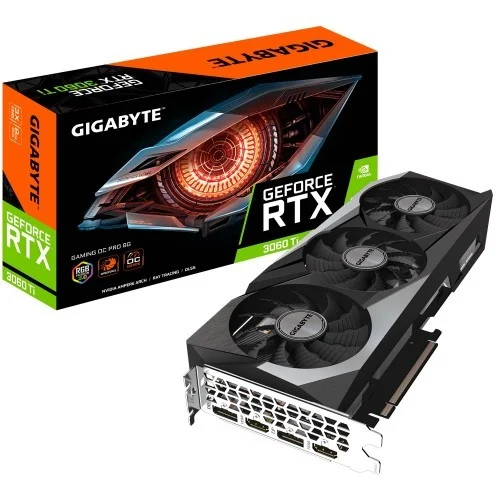
GIGABYTE GEFORCE RTX 3060 TI GAMING OC PRO 8GB GDDR6 GRAPHICS CARD
Out Of Stock


GIGABYTE GEFORCE RTX 3060 TI GAMING OC PRO 8GB GDDR6 GRAPHICS CARD
- Stock: Out Of Stock
- Model: GEFORCE RTX 3060 TI GAMING
- Product id: 18812
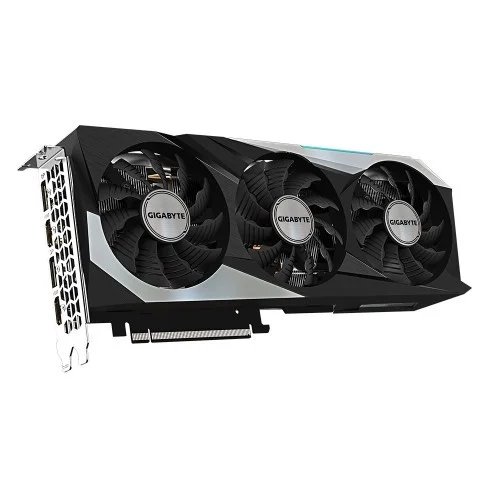
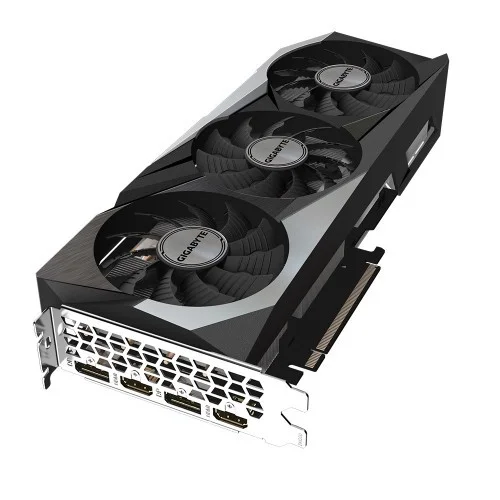
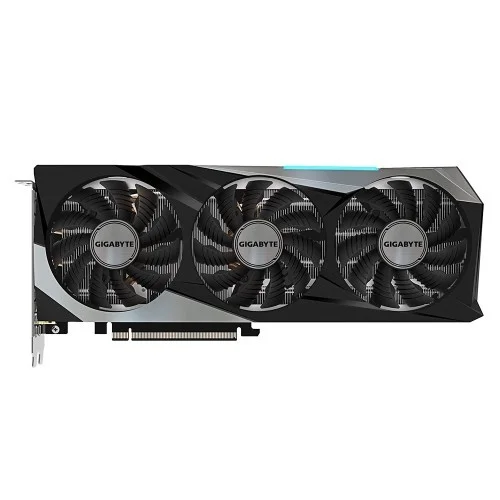
- • NVIDIA Ampere Streaming Multiprocessors • 2nd Generation RT Cores • 3rd Generation Tensor Cores • WINDFORCE 3X Cooling System
Chat Through
Quick Compare
| Product Details | ||||
| Product | GIGABYTE GEFORCE RTX 3060 TI GAMING OC PRO 8GB GDDR6 GRAPHICS CARD | Gigabyte GT 710 2GB DDR3 Graphics Card | OCPC GeForce GT 730 4GB DDR3 Graphics Card | Colorful GeForce GTX 1630 Mini 4GD6-V GDDR6 Graphics Card |
| Image |  |
 |
 |
 |
| Price | |
|
|
|
| Model | GEFORCE RTX 3060 TI GAMING | GV-N710D3-2GL | GT 730 | GeForce GTX 1630 Mini 4GD6-V |
| Brand | GIGABYTE | GIGABYTE | OCPC | COLORFUL |
| Availability | Out Of Stock | In Stock | In Stock | In Stock |
| Rating | Based on 0 reviews. |
Based on 0 reviews. |
Based on 2 reviews. |
Based on 1 reviews. |
| Summary | GIGABYTE GEFORCE RTX 3060 TI GAMING OC PRO 8GB GDDR6 GRAPHICS CARD The RTX 3060 Cooling System Features 3x 80mm Unique Blade Fans, Alternate Spinning, 3 Composite Copper Heat Pipes Direct Touch GPU, 3D Active Fan And Screen Cooling, Which Together Provide High-Efficiency Heat Dissipation. ALTERNATE SPINNING Alternate Spinning Can Reduce The Turbulence Of Adjacent Fans And Increase Air Pressure. SMOOTH AIRFLOW GIGABYTE Turns The Adjacent Fans In The Opposite Direction, So That The Airflow Direction Between The Two Fans Is The Same, Reducing The Turbulence And Enhancing The Airflow Pressure. 3D ACTIVE FAN The RTX 3060 3D Active Fan Provides Semi-Passive Cooling, And The Fans Will Remain Off When The GPU Is In A Low Load Or Low Power Game. UNIQUE BLADE FAN RTX 3060 Airflow Is Spilled By The Triangular Fan Edge And Guided Smoothly Through The 3D Stripe Curve On The Fan Surface. GRAPHENE NANO LUBRICANT Graphene Nano Lubricant Can Extend The Life Of The Fan By 2.1 Times, Close To The Life Of Double Ball Bearing, And Is Quieter. SCREEN COOLING Extended Heatsink Design Allows Airflow To Pass Through, Providing Better Heat Dissipation. HEAT PIPES DIRECT TOUCH RTX 3060 Shape Of The Pure Copper Heat Pipe Maximizes The Direct Contact Area With The GPU. The Heat Pipe Also Covers The VRAM Through A Large Metal Plate Contact To Ensure Proper Cooling. RGB FUSION 2.0 With 16.7M Customizable Color Options And Numerous Lighting Effects, You Can Choose Lighting Effects Or Synchronize With Other AORUS Devices. GIGABYTE GEFORCE RTX 3060 TI GAMING OC PRO 8GB GDDR6 Review Board partners have started to reveal their own custom design since the official launch of the GeForce RTX 3060 Ti and will be available for purchase from today onwards. Gigabyte has released a total of four models for this round – the AORUS GeForce RTX 3060 Ti MASTER 8G, GeForce RTX 3060 Ti GAMING OC 8G, GeForce RTX 3060 Ti EAGLE OC 8G, and GeForce RTX 3060 Ti EAGLE 8G. We managed to get our hands on the RTX 3060 Ti Gaming OC 8G for a quick run against the RTX 3070 Founders Edition to see just what kind of performance difference can we observe between both cards and if the RTX 3060 Ti is a better value for money. For the packaging, Gigabyte kept things simple as usual and most of the information on the features of the RTX 3060 Ti Gaming OC 8G can be found at the back of the box. On a side note, we did notice that Gigabyte is working on aligning the product naming for their graphics card and motherboard where MASTER and XTREME will be used exclusively for AORUS products. Not sure how will things turn out in the future but we hope that it’s not going to be too confusing for the end-users. For the RTX 3060 Gaming OC 8G, Gigabyte didn’t include any extra accessories inside the box, so there are no accessories pack included for this one but a user’s manual which most people will just ignore. Starting off with the design, we can see some similarities to the RTX 3070 Gaming OC and RTX 3090 Gaming OC in terms of design, but smaller. The RTX 3060 Ti Gaming OC 8G is still equipped with a triple-fan cooler and Gigabyte’s usual alternate spinning middle fan to deliver better cooling performance than the general triple-fan cooler with all the fans spinning in the same clockwise direction. Looking at how things go now, there’s a high chance that you might not be seeing any dual-fan cooler for the upcoming Gaming OC series cards because of the EAGLE series now being the more budget-friendly model for those who are looking for a more affordable option from Gigabyte. The RTX 3060 Gaming OC 8G comes in a rather compact dimension for a card with a triple-fan cooler, measuring 282mm in length, and will only take up two expansion slots in your system. This makes it a really good choice for those who want to build a compact small form factor but powerful system because of its dimensions which can easily fit into quite a number of small form factor PC case you can find nowadays. RGB element is kept at the minimal as usual, but you can still play around with it using Gigabyte’s RGB Fusion 2.0 software in case if you want to have some colors in your system or just want to disable all the lightings if you’re not a fan of RGB lightings, like me. As for the power requirement, NVIDIA recommends a 600W power supply for the RTX 3060 Ti, but you can still get away with a 550W power supply if it’s a good 80 PLUS rated unit and not having a power-hungry CPU like the Intel Core i9-10900K or AMD Ryzen 9 5900X in your system. Unlike the Founders Edition RTX 3060 Ti which requires a 12-pin PCIe power connector, Gigabyte like the rest of the board partners has decided to stick with the usual 8-pin PCIe power connector for the sake of convenience. My only dissatisfaction here is the position of the PCIe power connector, which Gigabyte decided to not doing it the same as what we’ve seen on the RTX 3070 Gaming OC 8G and RTX 3090 Gaming OC 24G. It’s not really a problem for most users but it will somehow annoy those who sought the perfect cable management look for their build. Specifications: Video Memory Specifications Type GDDR6 Size 8GB Resolution 7680x4320@60Hz Core Clock 1770 MHz (Reference Card: 1665 MHz) Memory Clock 14000 MHz BUS Type Memory Bus: 256 bit Card Bus: PCI-E 4.0 x 16 Stream Processors NVIDIA Ampere Streaming Multiprocessors CUDA Cores 4864 Interface Display Port DisplayPort 1.4a x 2 HDMI HDMI 2.1 x 2 Power Specifications Connectors 8 pin x 1 + 6 pin x 1 Recommended PSU 650W Application Programming Interfaces DirectX 12 Ultimate OpenGL 4.6 Physical Specifications Dimensions L=286 W=115 H=51 mm Warranty Manufacturing Warranty 02 Years Warranty .. | Gigabyte GT 710 2GBGigabyte GT 710 2GB DDR3 Graphics Card Gigabyte GT 710 2GB DDR3 Graphics Card Powered by NVIDIA GeForce GT 710 GPU Integrated with the first 2048MB DDR3 memory and 64-bit memory interface Core Clock: 954MHz Features Dual-link DVI-D / D-Sub / HDMI Support PCI Express 2.0 x8 bus interface Recommended system power supply requirement: 300W Gigabyte GT 710 2GB DDR3 Review Gigabyte GT 710 easy to physically install. Gigabyte GT 710 instructions failed to mention the BIOS. My monitor did not work at first because when I booted, it was plugged into the new card. I pressed "delete" a few times hoping the computer would open BIOS so i could shut down, plug back into the onboard video card and then enter BIOS to disable the onboard video, and default to the PCIe slot. Once I did that, we were in business. Someone who is not familiar with BIOS might suspect the card does not work...don't forget to change your BIOS when you use onboard video card BEFORE you install the card. Once I got past that hiccup, it was fine. What i do NOT like is these companies now send a card without a CD or installation software and drivers. Not everyone has internet these days Yes hard to believe, But i purchased this for someone who has a home desktop computer, when i installed the card i was stunned that there were NO drivers or installation disk in the box. Companies are getting so cheap. I had to drive home over 40 miles D/L the software place it on a CD drive back to install the software for the card to run. Totally ridiculous. Gigabyte GT 710 card on the other hand works great now that i have it installed., Make sure you install the software that comes with the video card. The windows default software technically works... but it is no good. Use the included software and then check for updates to assure you have the video card running at its best. Installation of software and drivers took forever. Once installed ran machine for about an hour. Next use was online gaming where this crashed and sent me to a black screen after only 10 minutes of online online multiplayer gaming. It has been returned and my older BFG 550 Ti is back in running like a champ. Specification: Graphics Card Memory Size 2 GB Graphics Engine GeForce® GT 710 Core Clock 954 MHz (Standard: 954 MHz) Memory Type DDR3 Card size H=21 L=144 W=68 mm Memory Clock v2.0 1600 MHz II v1.0 1800 MHz II Warranty 2 Years .. | OCPC GeForce GT 730 4GB DDR3 Graphics CardThe OCPC GeForce GT 730 4GB DDR3 Graphics Card is an excellent entry-level GPU designed for everyday computing, multimedia, and light gaming. Featuring 4GB DDR3 memory, it ensures smooth video playback, reliable performance, and support for popular applications. With HDMI, DVI, and VGA outputs, it offers wide compatibility with different monitors and systems. Its compact design makes it ideal for small form factor PCs, while low power consumption ensures efficiency without requiring an external power connector. Perfect for office work, casual gaming, and HD video streaming, the GT 730 is a budget-friendly upgrade for enhanced graphics performance.Main Features of OCPC GeForce GT 7304GB DDR3 memory for reliable performanceHDMI, DVI, and VGA outputs for multi-display supportCompact design suitable for small casesLow power consumption, no extra connector requiredIdeal for everyday tasks and HD video playbackCompatible with major operating systemsSupports DirectX and OpenGL technologiesFeatures and BenefitsSmooth Visuals: 4GB memory ensures better multitasking and video playback.Connectivity Options: HDMI, DVI, and VGA support multiple monitors.Compact Build: Fits easily in small desktops and office PCs.Energy Efficient: Runs without external power, saving energy.Budget-Friendly: Affordable choice for entry-level users.HD Ready: Handles high-definition videos with ease.Reliable Brand: Backed by OCPC’s trusted quality.Why Choose OCPC GeForce GT 730?The OCPC GeForce GT 730 4GB DDR3 Graphics Card is the perfect balance of affordability, reliability, and performance for office use, multimedia, and light gaming.Why Buy from Creatus Computer?Creatus Computer guarantees genuine products, best prices in Bangladesh, warranty support, and excellent after-sales service for every customer.FAQQ1: Can the GT 730 run modern games?A1: It can handle light and older games but is not designed for heavy gaming.Q2: Does it need external power?A2: No, it runs efficiently without additional power connectors.Q3: Is it good for dual monitors?A3: Yes, it supports multiple displays via HDMI, DVI, and VGA... | Colorful GeForce GTX 1630 Mini 4GD6-V GDDR6 Graphics CardThe Colorful GeForce GTX 1630 Mini 4GD6-V is a compact and powerful GDDR6 graphics card that delivers exceptional performance and visuals for gamers and multimedia enthusiasts. This graphics card is designed to fit into small form factor systems while still packing a punch in terms of gaming capabilities. With its compact dimensions of 183x127x39mm, it's perfect for those looking to build a compact gaming PC without sacrificing performance. At the heart of this graphics card is the GDDR6 memory with a 4GB capacity, offering fast and responsive performance for your gaming needs. The 12Gbps memory clock ensures smooth and lag-free gameplay, allowing you to immerse yourself in the latest games with stunning graphics. The 64-bit BUS type and 512 CUDA cores contribute to the card's ability to handle demanding graphics tasks and deliver an exceptional gaming experience. The Colorful GeForce GTX 1630 Mini boasts a core clock with a base speed of 1740MHz, which can boost up to 1785MHz. This means you can enjoy smooth gameplay in your favorite titles without stuttering or frame drops. It supports modern gaming technologies and is ready for the latest DirectX 12.1 and OpenGL 4.6, ensuring compatibility with the latest games and software. In terms of connectivity, the card offers a versatile set of ports and connectors. It features 1x DisplayPort, 1x HDMI, and 1x DL-DVI port, allowing you to connect to a variety of displays and peripherals, making it a versatile solution for your gaming and multimedia needs. Despite its compact size and impressive performance, the Colorful GeForce GTX 1630 Mini is power-efficient, with a recommended PSU of just 400W and a power consumption of 75W. This makes it a suitable choice for smaller PC builds that need to maintain energy efficiency.Colorful GeForce GTX 1630 Mini 4GD6-V Graphics Card FeaturesGDDR6 Memory: The graphics card is equipped with 4GB of GDDR6 memory, providing high-speed and responsive performance for gaming and multimedia tasks.Impressive Clock Speeds: With a base clock of 1740MHz and a boost clock of 1785MHz, this graphics card offers swift and smooth performance, ensuring lag-free gameplay and responsive graphics rendering.High Memory Clock: The card features a memory clock speed of 12Gbps, facilitating rapid data transfer between the GPU and memory for seamless gaming experiences.CUDA Cores: The Colorful GeForce GTX 1630 Mini is equipped with 512 CUDA cores, which are responsible for parallel processing and significantly enhance its ability to handle complex graphics workloads.Versatile Connectivity: It comes with a range of ports and connectors, including 1x DisplayPort (DP), 1x HDMI, and 1x DL-DVI port, allowing you to connect to various display options and peripherals.Compact Form Factor: The card is designed in a compact form factor with dimensions of 183x127x39mm, making it ideal for small form factor PC builds where space is limited.Power Efficiency: It's a power-efficient graphics card with a recommended PSU of just 400W and a power consumption of only 75W, which is great for energy-conscious users and small PC builds.Modern API Support: The Colorful GeForce GTX 1630 Mini supports the latest graphics APIs, including DirectX 12.1 and OpenGL 4.6, ensuring compatibility with the latest games and software.Warranty: Colorful offers a generous 3-year warranty, giving you peace of mind and ensuring the longevity and reliability of your investment in this graphics card.Compact Gaming Power: Despite its small size, this graphics card delivers a powerful gaming experience, making it suitable for gamers who want high-quality graphics without the need for a full-sized GPU.Excellent Price-Performance Ratio: This card provides a cost-effective solution for gamers and content creators looking for a balance between price and performance, making it a great choice for budget-conscious builds... |


