
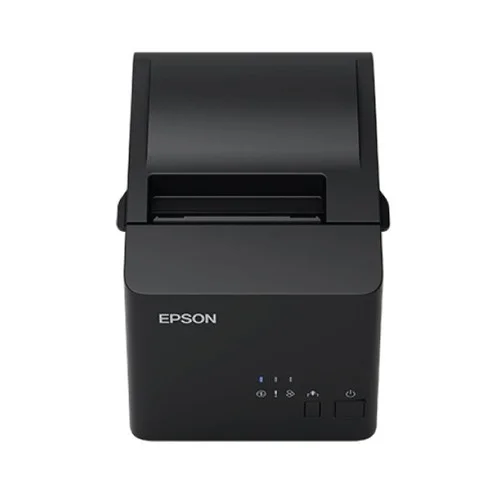
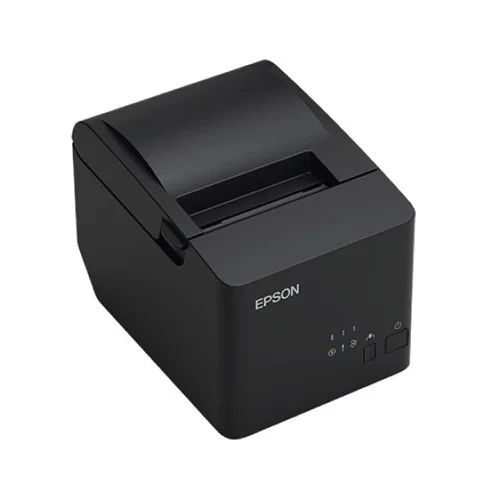
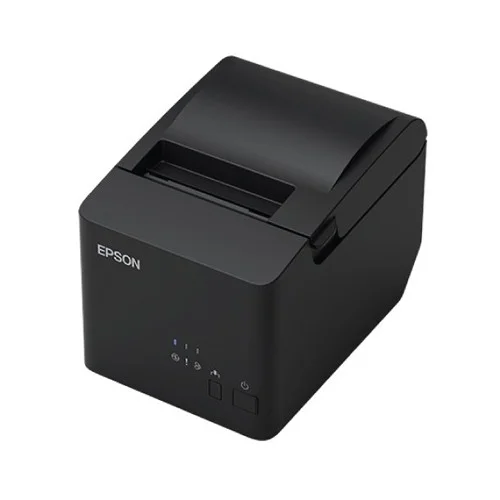
EPSON TM-T81III POS Printer USB & Serial Port, 1YW #C31CH26541
Save: 1500৳ (10%)


EPSON TM-T81III POS Printer USB & Serial Port, 1YW #C31CH26541
- Stock: In Stock
- Model: TM-T81III
- Product id: 28887
13,500৳
15,000৳
Ex Tax: 13,500৳
- Fast thermal receipt printing with sharp output
- USB & Serial connectivity for flexible POS setup
- Compact, space-saving design for counters
- 1-year official Epson warranty
Chat Through
Quick Compare
| Product Details | ||||
| Product | EPSON TM-T81III POS Printer USB & Serial Port, 1YW #C31CH26541 | HP Laser 1008a Single Function Mono Laser Printer | HP DeskJet Ink Advantage 4175 All-in-One Multifunctional Printer | Canon Pixma G1010 Refillable Ink Tank Printer |
| Image |  |
 |
 |
 |
| Price | |
|
|
|
| Model | TM-T81III | Laser 1008a | HP DeskJet Ink Advantage 4175 | Canon G1010 |
| Brand | EPSON | Hp | Hp | CANON |
| Availability | In Stock | In Stock | In Stock | In Stock |
| Rating | Based on 1 reviews. |
Based on 0 reviews. |
Based on 0 reviews. |
Based on 0 reviews. |
| Summary | Epson TM-T81III POS Printer USB & Serial Port #C31CH26541The Epson TM-T81III POS Printer (C31CH26541) is a reliable and cost-effective thermal receipt printer designed for retail, hospitality, and business environments. Featuring both USB and Serial connectivity, it ensures flexible integration with POS systems. With its fast printing speed and excellent print quality, the TM-T81III helps businesses deliver quick and efficient customer service. Its compact and durable design saves counter space while providing long-lasting performance. Ideal for shops, restaurants, and businesses handling daily transactions, this POS printer comes with a 1-year warranty, offering peace of mind and dependable operation for continuous business use.Main Features in Epson TM-T81III POS Printer USB & Serial Port #C31CH26541High-speed thermal receipt printer for business useUSB and Serial port for versatile connectivityCompact design saves valuable counter spaceCrisp, clear print quality for receipts and ticketsEasy paper loading for smooth operationEnergy-efficient and durable build1-year official Epson warrantyFeatures and BenefitsFast Printing: Ensures quick customer service at checkout.Versatile Connectivity: USB & Serial ports for flexible POS integration.Compact Design: Fits in tight retail and restaurant spaces.Clear Output: Provides sharp, professional receipts.Reliable Operation: Built for heavy-duty daily usage.Why Choose Epson TM-T81III POS Printer USB & Serial Port #C31CH26541?The Epson TM-T81III is perfect for businesses that need a compact, fast, and reliable POS receipt printer with versatile connectivity and durable performance.Why Buy from Creatus Computer?Creatus Computer offers genuine Epson printers with official warranty, competitive pricing, secure shopping, and reliable after-sales support. We ensure fast delivery and trusted service in Bangladesh.FAQQ1: What type of printer is the Epson TM-T81III?It is a thermal receipt printer designed for POS systems.Q2: Does it support both USB and Serial connections?Yes, it includes both USB and Serial ports for flexible integration.Q3: Where is this printer commonly used?It is widely used in retail stores, restaurants, and business transaction counters... | HP Laser 1008a Single Function Mono Laser PrinterHP Laser 1008a Single Function Mono Laser Printer, a versatile and efficient printing solution designed to meet the needs of home and small office environments. With its sleek and compact design, this printer seamlessly integrates into any workspace, combining functionality with style. Equipped with print-only functionality, the HP Laser 1008a is a single function mono laser printer that excels in producing high-quality black and white prints. Utilizing laser print technology, this printer delivers sharp, clear, and professional-looking documents with a print resolution of 1200 x 1200dpi, ensuring every detail is captured with precision. The printer's fast print speed of 20 pages per minute (ppm) for black prints ensures timely completion of printing tasks, enhancing productivity in the workplace. With a duty cycle of up to 10,000 pages and a monthly print capacity of 10,000 pages, the HP Laser 1008a is built to handle demanding printing needs, providing reliable performance day in and day out. Its manual duplex feature allows for efficient double-sided printing, saving time and paper. The printer accommodates a variety of paper sizes, including legal, letter, A4, A5, B5, and envelope sizes, catering to diverse printing requirements. It supports a wide range of paper types, including plain, thick, thin, cotton, color, preprinted, recycled, labels, cardstock, bond, archive, and envelope, offering flexibility for various printing projects. Additionally, with an input capacity of 150 sheets and an output capacity of 100 sheets, the printer minimizes the need for frequent paper refills. The HP Laser 1008a is equipped with a 400MHz processor, 64MB memory, and a convenient LED display for user-friendly operation. Its built-in USB interface ensures seamless connectivity with compatible devices, while the printer's power consumption of 320W contributes to energy efficiency. This white-colored printer with dimensions of 331 x 178 x 215mm and a weight of 4.18 kg is designed to blend seamlessly into any workspace. It supports the HP 166A Black Toner, offering a yield of 1500 pages, and is compatible with Windows 11 (64-bit), Windows 10, and Windows 7 (32-bit or 64-bit) operating systems. Backed by a 1-year limited warranty, the HP Laser 1008a ensures peace of mind for its users, accompanied by necessary support and the assurance of quality service. With its exceptional print quality, robust performance, and user-friendly features, the HP Laser 1008a Single Function Mono Laser Printer is an indispensable asset for those seeking reliable and efficient printing solutions.HP Laser 1008a Single Function Mono Laser Printer FeaturesToner/Cartridge Support: The HP Laser 1008a supports the HP 166A Black Toner, offering a yield of 1500 pages, ensuring long-lasting and cost-effective printing.Software and Warranty: The printer is compatible with Windows 11 (64-bit), Windows 10, and Windows 7 (32-bit or 64-bit) operating systems. Additionally, it comes with a 1-year limited warranty, providing users with peace of mind and support for their printing needs.These features collectively make the HP Laser 1008a Single Function Mono Laser Printer a reliable, efficient, and user-friendly printing solution for individuals and small businesses.Print-Only Function: This printer is designed exclusively for printing, making it a dedicated device for producing high-quality documents and images efficiently.Laser Print Technology: The use of laser print technology ensures sharp, clear, and professional-looking prints, making it ideal for business documents, reports, and other text-heavy materials.Print Speed and Resolution: With a print speed of 20 pages per minute (ppm) for black prints, the HP Laser 1008a enables fast and efficient printing. The impressive print resolution of 1200 x 1200dpi ensures that every detail is captured with precision, delivering crisp and clear outputs.Duty Cycle and Monthly Print Capacity: The printer's duty cycle of up to 10,000 pages and monthly print capacity of 10,000 pages make it suitable for handling moderate to high printing demands, ensuring reliability and consistent performance.Duplex Printing: The manual duplex feature allows for convenient double-sided printing, reducing paper usage and contributing to cost savings and environmental sustainability.Paper Handling: The printer accommodates various paper sizes, including legal, letter, A4, A5, B5, and envelope sizes, offering versatility for different printing requirements. It supports a wide range of paper types, such as plain, thick, thin, cotton, color, and recycled, catering to diverse printing needs.Input and Output Capacity: With an input capacity of 150 sheets and an output capacity of 100 sheets, the printer minimizes the need for frequent paper refills, promoting uninterrupted printing workflows.Technical Specifications: Equipped with a 400MHz processor, 64MB memory, and an LED display, the HP Laser 1008a ensures efficient performance and user-friendly operation.Connectivity: The built-in USB interface provides seamless connectivity with compatible devices, allowing for easy setup and printing from various sources.Power Consumption and Physical Specs: With a power consumption of 320W, the printer balances energy efficiency with performance. Its compact design, white color, and dimensions of 331 x 178 x 215mm, and weight of 4.18 kg make it a space-saving and aesthetically pleasing addition to any workspace... | HP DeskJet Ink Advantage 4175 All-in-One Multifunctional Printer The HP DeskJet Ink Advantage 4175 All-in-One Multifunctional Printer is an affordable wireless and USB all-in-one printer which is easy to setup and is highly secured in printing. Wireless connectivity with its remote app provides the facility to operate this device form your smartphone or tablet. Have a low budget printing with ink efficient printing up to twice as many pages. This compact designed printer enables print, copy, and scan to save money with limited space. Low space output tray 25 sheets of capacity reduces paper jam to make reliable while printing. Work fast and hands-free with the 35-page auto-feeder helps you complete scan and copy jobs quickly. Get started fast with simple setup that guides you through each step, using HP Smart app. Depend on low-cost Original HP ink cartridges to deliver the everyday documents and photos you need, and help save on printing by avoiding reprints. Original HP ink cartridges deliver sharp text and vibrant graphics for all your everyday documents and photos. Specifications: General Display Icon LCD display Power Input voltage: 200 to 240 VAC (+/- 10%), 50/60 Hz (+/- 3Hz) Power Consumption 1.0 watts (sleep) 0.1 watts (off) 0.1 watts (auto-off) Dimensions 428 x 332 x 200 mm Weight 4.82 kg Color White Print Print Speed black: .. | Specification Printing Features Print Speed Approx. 5.0ipm Resolution 4800 (horizontal)*1 x 1200 (vertical) dpi Interface USB 2.0 Hi-Speed Paper Handling Sizes A4, A5, B5, Letter, Legal, 4 x 6", 5 x 7", 8x 10", Envelopes (DL, COM10), Square (5 x 5"), Business Card, Custom size (width 55 - 215.9mm, length 89 - 676mm) Types A4, A5, B5, Letter, Legal, Envelopes (DL, COM10), Square (5 x 5"), Business Card, Custom size Weight Rear Tray Plain Paper: 64 - 105g/m2, Canon specialty paper: max paper weight: approx. 275g/m2 Photo Paper Plus Glossy II (PP-201) Output capacity A4, Letter = 50, Legal = 10 Copying Features Copy Speed Approx. 19secs. Physical Specification Color Black Dimensions (W x D x H) Factory configuration Approx. : 445 x 330 x 135mm Output / ADF trays extended : Approx. 445 x 529 x 253mm Warranty Information Warranty 01 year Canon Pixma G1010 Refillable Ink Tank Printer Price in Bangladesh Canon Pixma G1010 Refillable Ink Tank Printer is very useful for any office or organisation. This printer has 4800X1200dpi resolution capability with approx. 5.0ipmr printing speed. Document print speeds are the averages of ESAT in Office Category Test for the default simplex mode, ISO / IEC 24734. Photo print speed is based on the default setting using ISO / JIS-SCID N2 on Photo Paper Plus Glossy II and does not take into account data processing time on host computer. Print speed may vary depending on system configuration, interface, software, document . The performance of the printer may be reduced under certain temperature and humidity conditions. For this printer A4, A5, B5, Letter, Legal, 4 x 6", 5 x 7", 8x 10", Envelopes (DL, COM10), Square (5 x 5"), Business Card, Custom size (width 55 - 215.9mm, length 89 - 676mm) papers are available. TEC value was calculated assuming the unit will be constantly switched among operational mode, sleep mode, and power-off mode for 5 days, and that it will be either in sleep or power-off mode for the remaining 2 days within the same week. The TEC value of this product is calculated by Canon on its own accord. Depending on your terminal, such as a computer or a smartphone, or the operating system of your terminal, such as your computer or smartphone, the estimated ink level information or message displayed on the screen of your terminal may be different from the information or message displayed on the operation panel of the printer. Canon recommends that you use the information and message displayed on the operation panel of the printer as your reference. Note, however, that such information and message are displayed items that serve only as a guideline information. Canon Pixma G1010 Printer Features High Page Yield Ink Bottles: With high page yield ink bottles up to 7000 pages, users can enjoy printing without having to worry about cost of ink, or ink supplies running low. Integrated Ink Tank System: Built-in integrated ink tanks create a compact printer body. Users can also view remaining ink levels easily at a glance. Spill-Resistant Ink Bottle Design: The ink bottles come with a special tip design that reduces spillage during ink refilling. Canon Pixma G1010 Printer Reviews The Canon Pixma G1010 Printer comes with an in-built refill system for its ink tank. This product, however, does not have wireless connections and you will need to connect it the old way, i.e., with a USB cable. If you are looking for wireless printers, then this is not your choice, you may try the G3000 models. This model may lack Wifi connectivity but more than makes up for it with its ingenious design, brilliant ink refill system, and many other features. Here, we will look through these features: When it comes to design, Canon always takes into consideration the user experience to be gained from their products and the Canon Pixma G1010 Printer is no exception. With full-proof solutions to ink leakage and flexibility of use (i.e., to say the Canon Pixma G1010 Printer can be used in any work environment), it is undoubtedly one of the best-designed ink-jet printers. User-Friendly design for less messy workstation enables the users to fulfill their printing and scanning needs efficiently. The Canon Pixma G1010 Printer has undoubtedly a brilliant design. However, it does lack wireless connectivity features, but the placement of the paper tray and the output tray is perfect. Canon G1010 can print extremely well. It can provide a brilliant printing experience with an incredible print speed of about 8.8 ppm for black and about 5 ppm for colour prints. This is a very good speed when you consider printing in bulk amount. It also features manual duplex printing, i.e., printing on both sides. When it comes to scanning the Canon Pixma G110 Printer is a bit of a letdown. It is a single function printer; this means that you can only print a document and only that. You cannot use it for your scanning and copying needs. The Canon Pixma G1010 has a print resolution of 4800×1200 dpi, that too at a reasonable price. However, to some, it may seem high, nut the amount is worth it. The Canon Pixma G1010 Printer has a brilliant ink refill system, with the black coloured ink tank to the right and the coloured tanks of Cyan, Magenta, and Yellow to its left. The printer opens like a car hood, and you can easily refill them. You can buy the full set of cartridges for around Rs. 2200, whereas you can buy them separately at around Rs. 520. As per ISO standards, the cost of printing is 8 paise per page (black) and 21 paise per page (colour). Limited connectivity options are a major drawback of the Canon Pixma G1010 Printer. It does not have wireless connectivity. With this, you need to go old school, i.e., USB 2.0 ports; you need to connect your printer’s USB cable into a USB 2.0 port on your device. The Canon G1010 Printer is compatible with Windows 7 SP1, Windows 8.1 and Windows 10. However, do not upgrade it directly from one version of your OS to another, instead, delete the previous version and then install the newer one. Upgrading directly to the latest version may lead you to lose some features of your printer. However, if you follow the longer path, there is a chance you can keep the features intact. You can download Canon G1010 Drivers from here. .. |
Related Product


Recently Viewed

