
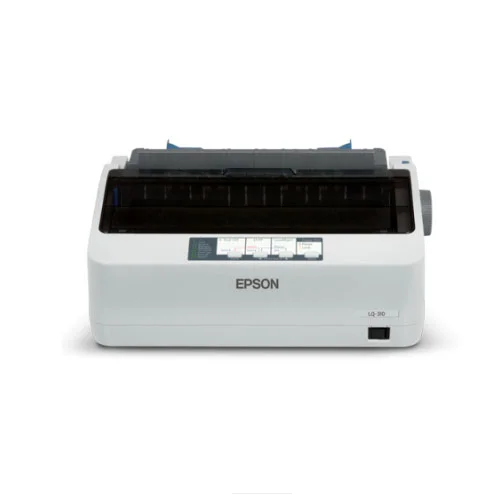
Epson LQ310 Dot matrix Printer
Save: 600৳ (2%)
In Stock
Epson LQ310 Dot matrix Printer
- Stock: In Stock
- Model: Epson LQ310
- Product id: 16267
23,900৳
24,500৳
Ex Tax: 23,900৳
- MPN: C11CC25301
- Print Speed: 347 / 416 cps
- Resolution:5760 Dpi
- Connectivity: USB2.0
Quick Compare
| Product Details | ||||
| Product | Epson LQ310 Dot matrix Printer | Canon imageCLASS LBP121dn Single Function Mono Laser Printer | Epson EcoTank M2050 Multifunction Monochrome Ink Tank Printer #C11CL00502 | Canon Pixma G3020 Wi-Fi Multifunction Color InkTank Printer |
| Image |  |
 |
 |
 |
| Price | |
|
|
|
| Model | Epson LQ310 | imageCLASS LBP121dn | EcoTank M2050 | Pixma G3020 |
| Brand | EPSON | CANON | EPSON | CANON |
| Availability | In Stock | In Stock | In Stock | In Stock |
| Rating | Based on 0 reviews. |
Based on 1 reviews. |
Based on 0 reviews. |
Based on 0 reviews. |
| Summary | Specification Print Speed (Black) 347 / 416 cps Print Resolution (Black) 5760 Dpi Paper Sizes Max.7.2-8.5 Inches Connectivity USB Warranty 1 Year Warranty Epson LQ-310 Dot Matrix Printer Price in Bangladesh Epson LQ310 Dot Matrix Printer has introduced the Epson LQ-310 as the next-generation narrow carriage, 24-pin model that replaces the legendary LQ-300, featuring vastly improved speed and reliability. Designed to do more with less, Epson LQ-310 offers fast printing at a low cost. Compact and capable, Epson LQ-310 24-pin dot-matrix printer features extraordinary speed, output quality, and reliability. Designed to do more with less, Epson LQ-310 offers fast printing at a low cost. Compact and capable, Epson LQ310 Dot Matrix Printer 24-pin dot-matrix printer features extraordinary speed, output quality, and reliability. Epson's constant innovations in printing solutions give you the best performing printer that suits your fast-paced environment. The Epson LQ-310 Dot Matrix Printer features a 128KB input data buffer memory that is double that of its predecessor. This enables it to achieve high printing speeds of up to 416 characters per second at 12 CPI - or almost 40% faster than the model it replaces. This type of printer uses print heads that contain 9-24 pins. These pins produce patterns, dotted patterns on paper to create individual characters. The 24 pin dot-matrix printer produces more dots as compared to a 9 pin dot-matrix printer that results in a higher quality and clearer characters. The rule of thumb is greater the number of pins, the clearer letters on paper. The pins strike the ribbon individually since print mechanism moves across the entire print line in both directions i.e. from left to right, then right to left etc. The user can produce a colour output with a dot-matrix printer (the user will change the black ribbon with a ribbon which has colour stripes). These printers are inexpensive and normally print at a speed of 100-600 characters per second. What is a dot matrix printer and how does it work? Those who have experience in the field of printers are usually linked to professions that involve many roles. In everyday tasks, a printer needs to offer an effective job. Of course, it is necessary to know the terms, but there is nothing like practice. In definition, a dot matrix printer is a computer peripheral that has the function of transcribing or marking a document from the computer to the paper. To do this, the print head moves from side to side using pins that mark the paper with ink to form the graphic that is printed. Advantages and Disadvantages of Dot Matrix Printers? In expert and customer opinion, the advantages and disadvantages of a dot matrix printer are fairly equal in number. The best option for you depends on your needs. Advantages Print on multilayer paper, which increases the number of possible copies Low cost per page Work with continuous paper Durable Disadvantages Noisy Limited color resolution Spindle pins sometimes fail How to Select the Best Printers? As in the case of any other computer peripheral, you need to be very selective while selecting printers. Here are some of the major areas which you will need to pay attention to while selecting printers online: - Displays Quite a few personal printers and business printers have small displays on their front panels to help you choose menu options or for communicate printer status. Though the typical display can include one or two lies of character based messages, higher -end and photo oriented printers can have a full-colour LCD with touch capability. Normally it is better to have any type of display, rather than mysterious, blinking lights. The Samsung printers which we have as a part of our collection have a speed of 43 ppm and consume a limited amount of power. Paper Handling Normally, both inkjet and laser printers print on letter and legal size paper. They come with input and output trays which can hold at least 100 sheets of paper. Printers with manifold paper trays can hold far more pages, which will help in reducing the frequency of tray refilling. There are a number of ways that printers can move through the feed. A number of them draw paper from the printer’s front using rubber rollers for guiding the paper out of the tray though the printer. In contrast, top-load printers use gravity for moving the paper down through the feeder and out from the printer’s front. This is a good option if you are sure that you will be printing on stiff media or other types of paper which cannot be bent. They have a high resolution of 4800x60 DPI effective. Printer Speed While shopping for a printer, you might come across some terms which indicate output speed. PPM (pages per minute) sometimes called CPM (copies per minute), decides how many pages per minute your printer can thrust. The higher the number of pages printed, the faster the print can copy or print your document. If you are shopping for a photo printer, you will come across the term IPM (images per minute) which goes by the same principle. Our range of Xerox printers have a high printer speed. They come with interesting features such as booklet printing, 256-bit payscale, mixed documents, watermarks, poster printing, N-up etc. They can scan through file formats such as BMP, PDF and TIFF. They can scan to PC and TWAIN applications. On the other hand, Samsung mono laser printers have a first print rate of less than 8.5 seconds. These printers come with a maximum duty cycle of 15000 printers. We are also offering Canon printers that have a high speed of printing and are equipped with a high speed cartridge. Some models have a copy speed of 12 seconds. Related Printer Brand Canon Printers POS Printers HP Printers Level Printers Ricoh Printers Zebra Printers Honeywell Printers Brother Printers Epson LQ310 Dot Matrix Printer Review Epson LQ-310 Dot Matrix Printer Dot Matrix Printer even provides smartphone apps in the form of the Epson iPrint and Epson Creative Print (available on both Android and iOS) to aid in printing photos directly off your smartphone. iPrint in fact, even lets you scan documents. You can set printing quality, specific paper size and type, and set other printer parameters before firing off a print. While it does allow you to toggle auto-correction and sharpness, I do wish iPrint offered more editing options for pictures though. Again, Creative Print is useful for when you want to get more creative and print out collages or outlines of your photos for colouring, but I couldn’t find a straightforward way of printing passport-sized photos. The Epson LQ-310 Dot Matrix Printer Dot Matrix uses piezoelectric tech to print out sharp, vibrant-looking photos, though you do need to be a bit patient if you choose the highest print quality. Prints can take over a minute, but if you do wait, you’d be rewarded with nice-looking prints... | Canon imageCLASS LBP121dn Single Function Mono Laser PrinterCanon imageCLASS LBP121dn Single Function Mono Laser Printer is a reliable and efficient printing solution designed for small to medium-sized businesses and home offices. This monochrome laser printer is engineered for high-quality black and white output, utilizing advanced laser beam printing technology to deliver crisp and clear documents. With a print speed of 29 pages per minute (ppm) for A4 paper and 30 ppm for Letter-sized paper, the LBP121dn ensures quick and efficient printing for various business needs. Its impressive print resolution of 600 x 600 dpi guarantees that text and graphics are sharp and professional-looking. The printer’s fast warm-up time of just 14 seconds and a first print out time of 5.4 seconds contribute to its overall efficiency, making it an excellent choice for busy environments. The LBP121dn features automatic duplex printing, allowing users to print on both sides of the paper effortlessly, which can help reduce paper consumption and lower operational costs. The printer supports a wide range of paper sizes, including A4, A5, A6, B5, Legal, Letter, Executive, Statement, Foolscap, Government Letter, Government Legal, Indian Legal, Index Card, Postcard, and various envelope sizes. It can handle different paper types, such as plain paper, recycled paper, labels, postcards, and envelopes, with weights ranging from 60 to 163 gsm. Equipped with a 250-sheet cassette and a 100-sheet multi-purpose tray, the LBP121dn offers a substantial input capacity, while its 150-sheet output capacity ensures uninterrupted printing for larger jobs. The printer’s 256MB memory ensures smooth handling of complex print jobs and large documents. Connectivity options include USB and LAN, allowing for easy integration into existing networks and systems. The printer is compatible with various operating systems, including Windows, Windows Server, Mac OS, Linux, and Chrome OS, ensuring versatility and ease of use across different platforms. With a compact design measuring 356 x 283 x 213mm and weighing just 5.6 kg, the LBP121dn fits neatly into any office space. It consumes approximately 530 W of power at maximum usage, making it an energy-efficient choice. The printer comes with a 1-year limited warranty, ensuring peace of mind and reliable performance. It uses Canon 071 and Canon 071H black toner cartridges, providing cost-effective and high-yield printing options.FeaturesPrint Only Functionality: Dedicated to delivering high-quality monochrome prints, this printer is designed for efficiency and reliability in producing black and white documents.High Print Speed: Capable of printing at 29 pages per minute (ppm) for A4 paper and 30 ppm for Letter-sized paper, ensuring fast and efficient printing for busy work environments.Sharp Print Resolution: With a print resolution of 600 x 600 dpi, this printer ensures clear, sharp text and detailed graphics in every document.Quick Warm-Up and First Print Out Time: The printer warms up in just 14 seconds and delivers the first print in 5.4 seconds, minimizing wait times and boosting productivity.Automatic Duplex Printing: Integrated duplex printing capability allows for automatic double-sided printing, reducing paper usage and operational costs.Versatile Paper Handling: Supports a wide range of paper sizes (A4, A5, A6, B5, Legal, Letter, Executive, Statement, Foolscap, Government Letter, Government Legal, Indian Legal, Index Card, Postcard, and various envelope sizes) and paper types (plain paper, recycled paper, labels, postcards, and envelopes), accommodating diverse printing needs.Ample Paper Capacity: Equipped with a 250-sheet cassette and a 100-sheet multi-purpose tray, this printer offers substantial input capacity, along with a 150-sheet output capacity for handling large print jobs without frequent refilling.Adequate Memory: 256MB memory ensures smooth handling of complex documents and large print jobs, facilitating efficient printing performance.Connectivity Options: Provides both USB and LAN connectivity, allowing for easy integration into different network environments and ensuring versatile usage.Compact and Lightweight Design: Measuring 356 x 283 x 213mm and weighing 5.6 kg, the printer's compact size makes it an ideal fit for various office setups.Energy Efficient: Consumes approximately 530 W of power at maximum usage, contributing to energy savings.Compatibility with Multiple Operating Systems: Supports a variety of operating systems including Windows, Windows Server, Mac OS, Linux, and Chrome OS, ensuring flexibility and ease of use across different platforms.Reliable Warranty: Comes with a 1-year limited warranty, providing assurance of durability and performance.Cost-Effective Toner Options: Utilizes Canon 071 and Canon 071H black toner cartridges, offering high-yield and cost-effective printing solutions... | Epson EcoTank M2050 Multifunction Monochrome Ink Tank Printer #C11CL00502The Epson EcoTank M2050 Multifunction Monochrome Ink Tank Printer (C11CL00502) is an efficient all-in-one printing solution for homes and small offices. Combining printing, copying, and scanning functions, it provides versatile performance at a low operating cost. Its EcoTank system allows high-volume printing with minimal refills, delivering sharp and professional-quality monochrome documents. Compact and user-friendly, the M2050 supports easy connectivity via USB, Wi-Fi, and mobile devices, making printing more convenient than ever. Backed by Epson’s reliable technology, this printer ensures consistent performance, energy efficiency, and durability, perfect for users seeking cost-effective multifunction printing solutions.Main Features in Epson EcoTank M2050 Multifunction Monochrome Ink Tank Printer #C11CL00502Multifunction: print, copy, and scan in one deviceHigh-capacity EcoTank system for low-cost printingCrisp and clear monochrome outputCompact and space-saving designWi-Fi and USB connectivity for flexible useEasy ink refilling system for uninterrupted printingEnergy-efficient and reliable performanceFeatures and BenefitsAll-in-One Functionality: Print, scan, and copy with a single device.Cost-Efficient Printing: High-capacity EcoTank reduces ink expenses.Wireless & USB Printing: Convenient connectivity from multiple devices.Professional Output: Sharp monochrome documents suitable for business or study.Compact Design: Fits easily in small offices or home setups.Why Choose Epson EcoTank M2050 Multifunction Monochrome Ink Tank Printer #C11CL00502?The Epson M2050 is perfect for those who need a reliable, cost-effective, and multifunctional monochrome printer. Its EcoTank system ensures low running costs, while Wi-Fi and USB support provide versatile printing options.Why Buy from Creatus Computer?Creatus Computer offers genuine Epson products with warranty, competitive prices, and fast delivery across Bangladesh. Benefit from expert guidance, reliable after-sales support, and a seamless shopping experience.FAQQ1: Can the Epson M2050 scan and copy documents?Yes, it is a multifunction printer with printing, scanning, and copying features.Q2: Does it support mobile printing?Yes, you can print via Wi-Fi from smartphones and tablets.Q3: Is it cost-effective for high-volume printing?Yes, the EcoTank system allows large-volume printing at minimal cost... | Canon Pixma G3020 Wi-Fi Multifunction Color InkTank PrinterThe Canon Pixma G3020 Wi-Fi Multifunction Color InkTank Printer is a wireless all‑in‑one color inkjet printer designed for high-volume home and small-office use. It combines printing, scanning, and copying into one compact, efficient machine, highlighted by its easy-to-refill ink tank system. Printing at up to 4800 × 1200 dpi, the PIXMA G3020 delivers sharp, vivid output, whether it's crisp documents or vibrant photos. With speeds reaching 9.1 ipm (black) and 5 ipm (color), plus a fast first print (9 sec mono, 16 sec color), it keeps pace with your workflow. Borderless photo printing up to A4 size provides seamless, full-page visuals. Connectivity is flexible and modern: Wi‑Fi, USB 2.0, and compatibility with Canon PRINT, AirPrint, Mopria, and Wireless PictBridge let you print straight from your mobile device or laptop. A simple 2-line LCD display makes navigation smooth and setup intuitive. Equipped with Canon GI‑71 ink bottles, the printer boasts high page yields—about 6,000 pages for black, 7,700 for color—which significantly lowers running costs. Designed for everyday reliability, it’s ideal for students, families, or small businesses that print frequently. At roughly 6.4 kg and compact dimensions, the PIXMA G3020 fits snugly in any workspace. With excellent print quality, economical ink technology, and modern wireless features, it's a smart and budget-conscious choice for versatile home-office printing.Features of Canon Pixma G3020 Wi-Fi Multifunction Color InkTank PrinterMulti-Function Performance: Combines printing, scanning, and copying in one space-saving unit.High-Quality Output: Delivers crisp documents and vibrant photos at a maximum resolution of up to 4800 × 1200 dpi.Efficient Speed: Prints up to ~9.1 ipm for monochrome and ~5 ipm for color, with first-page output in about 9 seconds (black) and 16 seconds (color).Cost-Effective Ink System: Features refillable ink tanks offering high page yields—approximately 6,000 pages in black and 7,700 in color—to significantly lower running costs.Wireless & Mobile Ready: Offers Wi‑Fi and USB connectivity, supporting mobile printing through apps like Canon PRINT, AirPrint, and Mopria.Borderless Photo Printing: Enables edge-to-edge photo output up to A4 size without margins.Flatbed Scanner: Built-in scanner with up to 600 × 1200 dpi resolution for sharp scans of documents and photos.Manual Duplex Support: Allows double-sided printing manually to conserve paper.Easy Navigation: Equipped with a simple 2-line LCD display for intuitive setup and operation.Wide Media Compatibility: Handles an array of paper sizes and types—from plain paper, envelopes, to glossy photo paper—and supports a rear tray with generous input capacity (e.g., 100 sheets of plain paper).Compact & Durable Design: Measuring approximately 445 × 330 × 167 mm and weighing around 6.4 kg, it’s compact enough for home or small office settings while still built to last... |
Related Product


Recently Viewed

