Canon PIXMA G2730 Multifunction Colour Printer
Save: 1600৳ (9%)
Canon PIXMA G2730 Multifunction Colour Printer
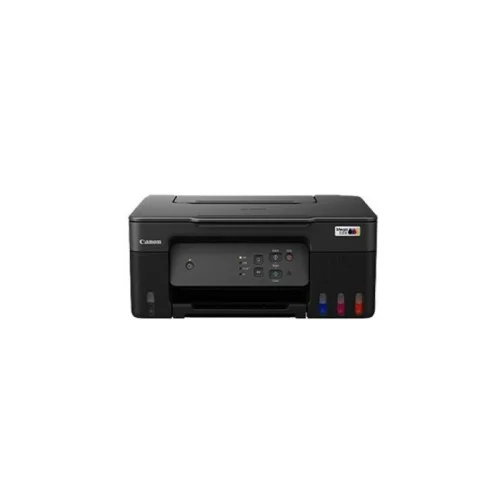
- Stock: In Stock
- Model: G2730
- Product id: 27979
* অনলাইনে প্রোডাক্ট অর্ডারের পূর্বে হেল্পলাইন থেকে স্টক এবং ডেলিভারী সর্ম্পকে সঠিকভাবে জেনে অর্ডার করার জন্য বিশেষভাবে অনুরোধ করা যাচ্ছে *
- USB: 2.0
- Speed: 11/6 ipm
- Resolution: 4800dpi
- Duty: 3,000 pages
| Copy | |
| Copy Speed | Document (Colour): (sFCOT/Simplex)/ (sESAT/Simplex) 23 sec / 2.7 ipm |
| Print Speed | Document (ESAT/Simplex): 11 / 6 ipm (mono/colour) Document (FPOT Ready/Simplex): 9 / 14 sec (mono/colour) Photo (4 x 6") (PP-201/Borderless): 45 sec |
| Print Resolution | 4,800 (horizontal)*1 x 1,200 (vertical) dpi |
| Paper Information | |
| Paper Size | Rear Tray: A4, A5, A6, B5, LTR, LGL, Executive, Oficio 2,B-Oficio , M-Oficio, Legal (India), A4, B5, LTR, 4 x 6", 5 x 7", 7 x 10", 8 x 10", Square (89 x 89 mm, 127 x 127 mm), Card Size (91 x 55 mm) |
| Paper Type | Plain Paper (64 - 105 g/m²) Photo Paper Plus Glossy II (PP-201, PP-208) Photo Paper Pro Luster (LU-101) Photo Paper Plus Semi-Gloss (SG-201) Matte Photo Paper (MP-101) |
| Paper Weight | Rear Tray: |
| Technical Specs | |
| Power Consumption | OFF: 0.1 W Standby (scanning lamp is off) USB connection to PC: 0.6 W Copying (USB connection to PC): 15 W |
| Physical Specification | |
| Weight | 6 kg |
| Dimensions | Factory Configuration: 416 x 337 x 177 mm Output/Trays Extended: 416 x 557 x 268 mm |
| Warranty Information | |
| Warranty | 01 Year |
Canon PIXMA G2730 Multifunction Colour Printer
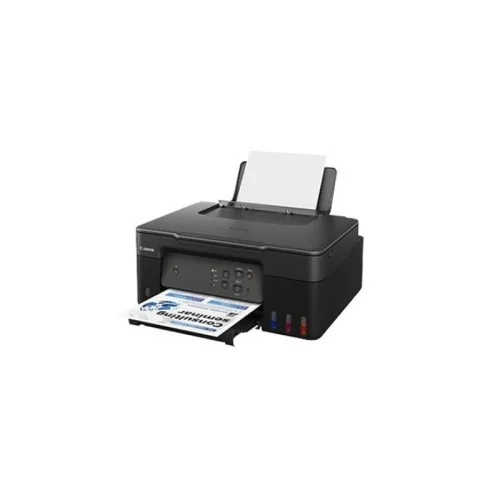
The Canon PIXMA G2730 Multifunction Colour Printer is a highly efficient and versatile solution for both home and office environments. Combining the functions of printing, scanning, and copying, it delivers high-quality results with ease. Its advanced InkTank technology ensures exceptional value for money, making it an ideal choice for users who require high-volume printing with low-cost maintenance. With a print resolution of 4800 x 1200 dpi, the G2730 produces sharp, clear text and vibrant color prints, making it suitable for both professional documents and high-quality photo prints. It offers a print speed of 11 ipm for mono and 6 ipm for color, ensuring quick results without sacrificing quality. For photo enthusiasts, it can produce a 4 x 6" borderless print in just 45 seconds, making it ideal for photo printing at home. The copy function is efficient, with a copy speed of 23 seconds for the first copy and a copy rate of 2.7 images per minute (ipm) for simplex documents, making it perfect for everyday copying needs. The G2730 also supports a wide range of paper sizes, from A4 and A5 to various photo paper sizes, and it can handle multiple paper types such as plain paper, glossy photo paper, and more. In terms of power efficiency, the G2730 has a low standby power consumption of 0.6 W, and when in off mode, it uses just 0.1 W. With a 1-year warranty, this printer offers reliable performance for users looking for an affordable, all-in-one printer that doesn't compromise on quality or efficiency.
Quick Compare
| Product Details | ||||
| Product | Canon PIXMA G2730 Multifunction Colour Printer | Pantum P3010DW Single Function Mono Laser Printer | Epson L130 Inkjet Printer | Brother DCP-T220 Multi-Function Inkjet Printer |
| Image | |
|
|
|
| Price | |
|
|
|
| Model | G2730 | P3010DW | Epson L130 | DCP-T220 |
| Brand | CANON | Pantum | EPSON | BROTHER |
| Availability | In Stock | In Stock | In Stock | In Stock |
| Rating | Based on 0 reviews. |
Based on 0 reviews. |
| Summary | Canon PIXMA G2730 Multifunction Colour PrinterThe Canon PIXMA G2730 Multifunction Colour Printer is a highly efficient and versatile solution for both home and office environments. Combining the functions of printing, scanning, and copying, it delivers high-quality results with ease. Its advanced InkTank technology ensures exceptional value for money, making it an ideal choice for users who require high-volume printing with low-cost maintenance. With a print resolution of 4800 x 1200 dpi, the G2730 produces sharp, clear text and vibrant color prints, making it suitable for both professional documents and high-quality photo prints. It offers a print speed of 11 ipm for mono and 6 ipm for color, ensuring quick results without sacrificing quality. For photo enthusiasts, it can produce a 4 x 6" borderless print in just 45 seconds, making it ideal for photo printing at home. The copy function is efficient, with a copy speed of 23 seconds for the first copy and a copy rate of 2.7 images per minute (ipm) for simplex documents, making it perfect for everyday copying needs. The G2730 also supports a wide range of paper sizes, from A4 and A5 to various photo paper sizes, and it can handle multiple paper types such as plain paper, glossy photo paper, and more. In terms of power efficiency, the G2730 has a low standby power consumption of 0.6 W, and when in off mode, it uses just 0.1 W. With a 1-year warranty, this printer offers reliable performance for users looking for an affordable, all-in-one printer that doesn't compromise on quality or efficiency... | Specification Functions Print Only Printer Type Single Function Mono Laser Output Color Black & White Technology Mono laser Print Speed 30ppm (A4) / 32ppm (Letter) Print Resolution 1200x1200 dpi (Max.) First Print Out Time Less than 8.2 seconds Duty Cycle up to (Yield) 60000 pages Duplex Automatic Paper Size A4, A5, JIS B5, IS0 B5, A6, Letter, Legal, Executive, Folio, Oficio, Statement, Japanese Postcard, ZL, Big 16K, Big 32K, 16K, 32K, B6, Yougata4, Postcard, Younaga3, Nagagata3, Yougata2 Paper Type Plain, Thick, Thin, Transparency, Cardstock, Label Paper Weight Input tray:60-105g/sqm Multipurpose tray:60-200g/sqm Input Capacity 250pages Output Capacity 150 pages Processor 350 MHz Memory 128 MB Display 2 line LCD Connectivity USB, LAN, WiFi Power Consumption AC100-127V(+-10%), 50Hz/60Hz(+-2Hz), 9A, AC220-240V(-15%,+10%), 50Hz/60Hz(+-2Hz), 4.5A, 525W (Print), 50W (Standby) Color White Dimension 354 x 232 x 334mm Weight 6.8Kg Toner/ Cartridge/ Refill TL-410H (3000 pages) Software Windows 7, 8, 8.1, 10, Vista, XP, Server 2003, 2008, 2012, Mac OS 10.7-10.13, Linux: Ubuntu 12.04/14.04/16.04/18.04, iOS 7.0 and above, Android 4.4 and above Warranty 1 Year Warranty Pantum P3010DW Single Function Mono Laser Printer The Pantum P3010DW is a cost-effective single function mono laser printer suitable for small to large workgroups. It has a print speed of 30ppm and a resolution of 1200 x 1200dpi. The printer supports duplex printing and various paper sizes and types. It has a 2-line LCD display and connectivity options including USB, LAN, and WiFi. The printer has a monthly duty cycle of up to 60,000 pages and a low paper jam rate. It is easy to install and has a compact design. The Pantum P3010DW is eco-friendly and comes with a 1-year warranty. .. | Specification: Print Speed (Black) 27 ppm Print Resolution (Black) 5760 Dpi Paper Sizes A4, A5, A6, B5, C6, DL Connectivity USB2 Warranty 1 Year Warranty Epson L130 Inkjet Printer Price in BD Epson L130 solitary feature shade inkjet printer with USB. This Epson L130 color inkjet printer features on-demand inkjet print method, print speed (black): 27ppm, print speed (shade): 15ppm, Print resolution (black): 5760 x 1440 dpi, print resolution (shade): 5760 x 1440 dpi, paper sizes: A4, A5, A6, B5, C6, DL; ink containers: black, cyan, yellow, magenta; connectivity: USB 2.0 hi-speed, input capacity: 50 sheets, A4 ordinary paper (75g/m2) 10 sheets, premium glossy photo paper; result ability: 30 sheets, A4 ordinary paper 20 sheets, premium shiny photo paper (10x15cm/4x6", 13x18cm/5x7", 9x13cm/3.5 x5"); height: 130 mm, size: 472 mm, weight: 2.7 Kg, depth: 222 mm and so on. What is sublimation printing? Sublimation is the process of transferring a printed image onto a surface through heat and pressure. Mugs that have images on are usually produced in this fashion, but that is not all. Sublimation can also be used for fabric printing, glass picture tiles, custom phone cases, and much more. For all the information you may need check out our Sublimation FAQ page. What can I sublimate on to? If you are unsure what items can be sublimated on to, please take a look at our information page here How to sublimate on products Our basic how-to guides are very useful for clients who are new sublimation and give a basic guide to how to print on to popular ‘sublimatable’ products- Printing a sublimation mug How to print a sublimation T-Shirt / fabric item How to print a sublimation metal sheet Why the Epson L130 Inkjet Printer? Not only is this printer easy to use, but it offers excellent value and includes some amazing functions you won’t find on other printers. The main attraction of this printer is the Ecotank, and the biggest advantage of it is the fact that it will never ask for ink. No ink out messages will interrupt your printing, meaning you can stack up the paper feed and leave it printing indefinitely. In other words the printer will never stop printing as long as it has ink in the tank and paper in the feed. For this reason alone multiple customers have switched to this system. Moreover, the print quality is outstanding for a 6 colour machine and it is capable of printing A4 / A3 and A3+ size documents. Images are rich in colour and transferred images lose no detail. Related Printer Canon Printers POS Printers HP Printers Level Printers Ricoh Printers Zebra Printers Honeywell Printers Brother Printers Epson L130 Inkjet Printer Review When Epson introduced the Epson L130 Inkjet printer, it struck the right chords with both domestic as well as industrial customers, and it really set the benchmark for that segment of printers, with many wondering if there was anything Epson could do to outshine this product, Turns out they could. The Epson L130 is Epson’s new ink tank printer that can do everything the Epson L130 Inkjet Printer can with the addition of the ability to print documents in A3 or A3+ size options as well. With this new size option, the L130 places itself among the limited ink tank printers that can indeed print at these sizes, thus making a true exclusive printer device. Let’s take a look at the New Epson L130 Inkjet printer and see what it packs under the hood. The Printing Performance The first most important facet that people look at in a printer is its printing speed and the range of printing. Epson Printers are well known for stellar performances in both those areas, and the L130 seeks to keep that juggernaut rolling. Now, the real world performance definitely depends on the usage of the individual, but on paper, the print speed of the Epson L130 up to 18ipm for A4 and 10 ipm for A3. This is thanks to Epson’s ‘Precision Core’ Printheads. Like most printers today, the Epson L130 can scan and copy as well. They have included an LCD display to assist users with the various functionalities, so there won’t be a hitch there. When it comes to the printing range, each set of inks is capable of printing close to 6000 pages in black, and around 6500 pages in colour. If you are someone who follows printers closely, you will notice that the range here is almost similar to the range of the L605 and the L655 variants... | Specification General Display 1 Line LCD Display Power AC 110 to 120 V 50/60 Hz Power Consumption Copying: Approx. 12 W Ready: Approx. 2.5 W Sleep: Approx. 0.7 W Power Off: Approx. 0.2 W Dimensions 159 x 435 x 359 mm Weight 6.3 Kg Color White Print Print Speed Black/Color: 28/11 ppm Resolution Up to 1200 × 6000 dpi Print Technology InkJet Copy Copy Speed Black/Color: 28/11 ppm Resolution up to 1200 × 1800 dpi Zoom 25% to 400% Scan Bit Depth 30 bit color processing (Input) 24 bit color processing (Output) Resolution Up to 19200 × 19200 dpi (interpolated) Up to 1200 × 2400 dpi (optical) Maximum Size Width: Up to 8.42 in. (213.9 mm) Length: Up to 11.61 in. (295 mm) Paper Handling Paper Size Letter, A4, Legal, Mexico Legal, India Legal, Folio, Executive, A5, A6, Envelopes (C5, Com-10, DL, Monarch), Photo (4" x 6")/(10 x 15 cm), Photo 2L (5" x 7")/(13 x 18 cm), Index card (5" x 8")/(13 x 20 cm) Paper Type Plain Paper, Inkjet Paper (coated paper), Glossy Paper, Recycled Paper Paper Weight 80 g/m² Input Capacity 150 sheets Output Capacity 50 sheets Maximum Number of Copies 99 pages Connectivity USB USB 2.0 Warranty Warranty 1 Year Brother DCP-T220 Multi-Function Inkjet Printer With the Brother DCP-T220 Multi-work Color Printer, print pages-after-pages rapidly without stressing over expense or running out of ink. This printer conveys a Print Speed of up to 28/11 ppm, and it has a Transparent Cover on the Refill Tank System for simple front access. Additionally, with Brother's Ultra High Yield Ink bottles, you can print various pages without going through a great deal of cash. This printer can also be so easy to print with achievements for speeds up to 28/11 ppm. In this way, you can print various copies in less time. Consequently, regardless of whether you need to print handouts, flyers, or whatever else, you can without much of a stretch print whatever you need utilizing this Brother printer. With the Brother's Ultra High Yield Ink bottles, you can print up to 7,500 high contrast pages and 5,000 shading pages. Accordingly, you can print easily at home. The Refill Tank System of this printer has a straightforward cover, so you can get to the inserted ink tank effectively from the front. Accordingly, it is an easy-to-understand PC adornment that has an okay of spillage and wreck. Brother DCP-T220 Printer review The Brother DCP-T220 is a decent printer for both home office and student use. It has an impressive printing speed and a low cost-per-print even if you are completing large printing jobs. It also has a big input tray that can hold a good amount of paper, and it includes a display screen that can be raised to the user's preference. It has an excellent design which makes it easier to remove paper jams from the back. Unfortunately, this printer doesn't include a scanner and if you need to print photos, there's a lot of banding in the colors. Brother’s DCP-T220 offers a lot of value for a printer in its price range. It has all the features you’d want in a printer like photocopying and scanning with the added benefit of doing everything wirelessly, and without the need for a PC. Its inks are cheap considering what you’re getting, and while the initial outlay is a little steep, the inks are pretty cheap, perfect for WFH professionals that still need to produce documents during our home-bound existence nowadays. The Brother DCP-T220 is Priced at Php 7,650 with ink cartridges costing Php 390 per color/bottle. The ability to print with ease from home is a new need that emerged from the modern plague. And if you’re still using a printer that you can access by hooking up to a PC, you’re about due for an upgrade. A wireless printer offers the convenience of printing remotely wherever you are in the house. Brother’s new DCP-T220 is specifically made for home and small office use, and its convenient features reflect that. Brother has included everything you need to print out of the box, all you have to do is to plug-and-play. Out of the box, there is the printer itself, its instruction manual, a power chord, a USB to PC chord, four bottles of ink (cyan, magenta, yellow and black.) These bottles of ink are enough to fill up the entire ink tank. Print time for color or black and white documents typically takes around 10 seconds from the time you send the file to be printed and picking it up from the paper tray. Official print specs for the printer is 16 inches per minute for mono (black and white) prints and 9 inches per minute for color documents. Print and ink yield Black and white documents print fast and accurately on the Brother DCP-T220. Documents come out crisp and sharp in both normal and draft print settings. The printer can render light and dark shades in mono printing which translates well on photos as well. For colored images, the Brother DCP-T220 allows borderless printing so you can maximize printing on photo paper without having to cut out white borders. For fine quality printing which is ideal for printing on thicker material like card stock and photo paper, the DCP-T420 takes its time and delivers vibrantly colored images that don’t come out wet on the paper even when set to its finest print setting. The DCP-T220 makes use of BT5000 inks for its cyan, magenta, and yellow inks, and D60 ink for black. These are still the same inks used by Brother’s previous inkjet printers so you can use your old stock of ink on this newer model. In older models according to Brother’s standard print tests, the print yield of these inks cartridges averages 6,500 pages of black and white documents with both the BT5000 and D60 refills. The newer Brother DCP-T220 printer models offer an additional 1,000 black and white pages making one bottle of black D60 ink capable of printing 7,500 black and white pages. Brother Ink cartridges costs Php 390 per bottle / color... |
|
|
|
|
|
|
Related Product
Recently Viewed
16,500৳ 18,450৳
Ex Tax:16,500৳