
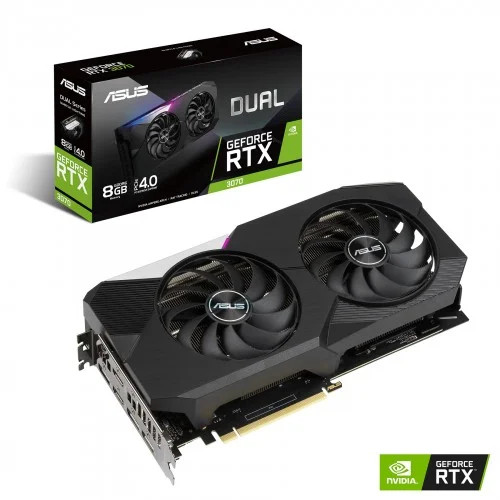
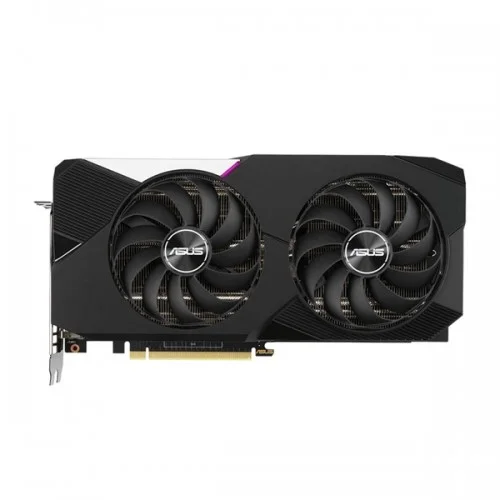
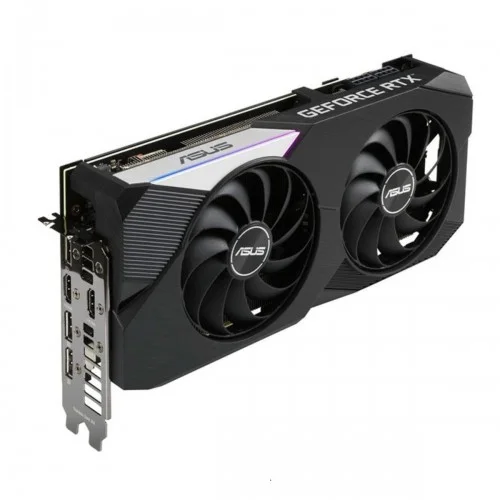
ASUS Dual GeForce RTX 3070 8GB GDDR6 Graphics Card
Discontinued


ASUS Dual GeForce RTX 3070 8GB GDDR6 Graphics Card
- Stock: Discontinued
- Model: ASUS Dual RTX 3070 8GB
- Product id: 22521
- NVIDIA Ampere Streaming Multiprocessors
- Auto-Extreme Technology
- 2nd Generation RT Cores
- Axial-tech fan design
Chat Through
Quick Compare
| Product Details | ||||
| Product | ASUS Dual GeForce RTX 3070 8GB GDDR6 Graphics Card | Gigabyte GT 710 2GB DDR3 Graphics Card | OCPC GeForce GT 730 4GB DDR3 Graphics Card | Colorful GeForce GTX 1630 Mini 4GD6-V GDDR6 Graphics Card |
| Image |  |
 |
 |
 |
| Price | 0৳ | |
|
|
| Model | ASUS Dual RTX 3070 8GB | GV-N710D3-2GL | GT 730 | GeForce GTX 1630 Mini 4GD6-V |
| Brand | ASUS | GIGABYTE | OCPC | COLORFUL |
| Availability | Discontinued | In Stock | In Stock | In Stock |
| Rating | Based on 0 reviews. |
Based on 0 reviews. |
Based on 2 reviews. |
Based on 1 reviews. |
| Summary | ASUS Dual GeForce RTX 3070 8GB GDDR6 Graphics Card ASUS Dual GeForce RTX 3070 melds performance and simplicity like no other. Leveraging advanced cooling technologies derived from flagship graphics cards, the Dual GeForce RTX 3070 opts for substance over style, the perfect choice for a well-balanced build. Buckle up and engage cutting-edge gaming prowess. Real-Time Ray Tracing Real-Time Ray Tracing The ASUS Dual GeForce RTX 3070 platform enables real-time ray tracing of objects and environments with physically accurate shadows, reflections, refractions, and global illumination. The RTX 3070 features 7 Giga rays per second and up to 52T RTX-OPS NVIDIA GPU Boost 4.0 NVIDIA Ansel With Ansel, gamers can compose the gameplay shots they want, pointing the camera in any direction and from any vantage point within a gaming world. They can capture screenshots at up to 32 times the screen resolution, and then zoom in where they choose without losing fidelity. With photo-filters, they can add effects in real-time before taking the shot. And they can capture 360-degree stereo photospheres for viewing in a VR headset or Google Cardboard. CUDA NVIDIA's parallel computing platform enables an increase in computing performance by harnessing the parallel nature of GPU processing. CUDA-compatible applications can assign intensive parallel computing tasks, such as real-time video rendering, to the GPU to process, freeing up the computer's CPU to run other tasks. G-SYNC Ready When used with a monitor that has G-SYNC hardware installed, the monitor's refresh rate will sync and lock with the graphics card's output frame rate. Establishing this sync removes tearing and stuttering which can result from conventional fixed screen refresh rates, especially important for gaming in stereoscopic 3D. An additional benefit of G-SYNC is reduced lag so gamers will benefit from the improved command response time as well. GPU Tweak II The ASUS GPU Tweak II utility takes graphics card tuning to the next level. It allows you to tweak critical parameters including GPU core clocks, memory frequency, and voltage settings, with the option to monitor everything in real-time through a customizable on-screen display. Advanced fan control is also included along with many more features to help you get the most out of your graphics card 144−Hour Validation Program Each card must meet rigorous performance and reliability standards before it ships. Performance and stress tests are run with the latest chart-topping titles like Fortnite, League of Legends, Overwatch, and PlayerUnknown's Battlegrounds. We also carry out reliability trials that include a 144-hour stability test and a series of 3DMark benchmarking runs to ensure the card performs well when pushed to the limits. ASUS Dual GeForce RTX 3070 8GB GDDR6 Review ASUS Dual GeForce RTX 3070 Noctua OC is a pleasant surprise this season, which is dominated by news from AMD and Intel. Personally, I've always wondered why Noctua doesn't get involved in more collaborations—with an extremely strong reputation and brand name, they are THE cooling specialists. I feel like ASUS is a great match for Noctua, as they have tons of experience with graphics card engineering and can offer the resources to support such a project. NVIDIA launched the GeForce RTX 3070 almost exactly a year ago, on October 27th 2020. In my launch-day review, I was impressed by the performance, which beat last generation's RTX 2080 Ti flagship. This still hasn't changed. Even today, the RTX 3070 is an excellent card with tons of horsepower to breeze through all the latest titles at 1440p. You're also able to play most games at 4K if you're willing to reduce details a little bit. ASUS has given their Noctua card a factory OC, up to a rated boost of 1815 MHz from NVIDIA's default of 1725 MHz. This is a 5.2% increase; in reality, the real-life performance gained is around 1%—surprising, but not unexpected. Other RTX 3070 designs we've reviewed, of which there are seven in total, don't do much better here. For daily gaming, it'll be impossible to subjectively notice the performance difference, we're talking 100 vs. 101 FPS here. Compared to the Radeon RX 6700 XT, the ASUS RTX 3070 is 8% faster, and the RTX 3060 Ti is 12% behind. NVIDIA launched the RTX 3070 Ti a while ago; it's only 4% faster than the ASUS card, and AMD's RX 6800 is 10% ahead. The highlight of the RTX 3070 Noctua is definitely the massive cooling solution. ASUS has taken their RTX 3070 TUF as base, kept the PCB design, and engineered a completely new heatsink and fan shroud. The fans used are standard Noctua NF-A12x25 120 mm fans (our review is here). I really like this approach, and maybe it's the future of graphics card cooling. If we had standard fans on graphics cards like we do on CPU coolers, enthusiasts would be able to mix and match the fans to optimize their cooling setup. Standard fans would also make it trivial to replace a broken graphics card fan, which is the number one reason why old graphics cards are dying. On the other hand, visually, the Noctua RTX 3070 doesn't look as refined as cards like the NVIDIA Founders Editions with their highly polished, industrial design. I'm sure there will be a lot of talk about the color choices and appearance of the RTX 3070 Noctua—both are secondary to me, what matters are noise levels and cooling performance. Noise levels of the RTX 3070 Noctua are so impressive I had to double check that the fans were really spinning because I couldn't hear the graphics card at all even while running heavy gaming workloads at 4K. With 23.1 dBA, the card is truly whisper-quiet, and has set a new record. I've reviewed over 700 graphics cards in the last 15 years, and none was as quiet as the RTX 3070 Noctua. You could argue that the few passively cooled cards on the market are quieter, but these play in a completely different league performance-wise. While low noise levels usually mean high temperatures, this is not the case with the RTX 3070 Noctua. Thanks to a huge quad-slot cooling design, the heatsink can easily handle the heat output of the RTX 3070 GPU—temperatures are as low as 66°C while fully loaded, and almost inaudible. These results are with the "quiet" BIOS, which is the default setting, unlike all other ASUS graphics cards using the "Performance" setting by default. Personally, I feel like making the "quiet" BIOS the default is the better choice, as the thermal and performance differences are negligible on most cards. It's similar here. With the "Performance" BIOS activated, the card reached 60°C instead of 66°C—besides the number, there is no difference. Noise levels go up a bit, to 26 dBA, which is still very quiet. As expected, idle-fan stop is supported by the ASUS RTX 3070 Noctua. The fans will stop in idle, light gaming, productivity and Internet browsing for the perfect noise-free experience. We introduced our apples-to-apples heatsink testing a few months ago, and it helps conclusive determine the cooling capability of a heatsink while taking the rest of the card out of the equation. Here, the RTX 3070 Noctua achieves impressive results, too. The cooler is better than any Founders Edition cooler NVIDIA ever made with the exception of the RTX 3090 Founders Edition. This is somewhat expected considering the huge quad-slot form factor, but it's also confirmation that the magic is not only in the Noctua fans, but also the ASUS heatsink design. It also means that similar characteristics can be achieved by other graphics card vendors even without Noctua as long as they are willing to go beyond the triple-slot thickness. Multi-GPU setups are dead in 2021, so I'm not concerned about the physical size of the card at all. Specification Video Memory Specifications Type GDDR6 Size 8GB Resolution 7680x4320 Core Clock OC Mode - 1755 MHz (Boost Clock) Gaming Mode - 1725 MHz (Boost Clock) Memory Clock 14 Gbps BUS Type PCI Express 4.0 Memory Interface 256-bit CUDA Cores 5888 Interface Display Port Yes x 3 (Native) (DisplayPort 1.4a) HDMI Yes x 2 (Native) (HDMI 2.1) HDCP Yes (2.3) Power Specifications Connectors 2 x 8-pin Recommended PSU 750W Display Option Multi Display 4 Application Programming Interfaces DirectX 12 Ultimate OpenGL 4.6 Physical Specifications Dimensions 267 x 135 x52 mm Warranty Manufacturing Warranty 2 Years .. | Gigabyte GT 710 2GBGigabyte GT 710 2GB DDR3 Graphics Card Gigabyte GT 710 2GB DDR3 Graphics Card Powered by NVIDIA GeForce GT 710 GPU Integrated with the first 2048MB DDR3 memory and 64-bit memory interface Core Clock: 954MHz Features Dual-link DVI-D / D-Sub / HDMI Support PCI Express 2.0 x8 bus interface Recommended system power supply requirement: 300W Gigabyte GT 710 2GB DDR3 Review Gigabyte GT 710 easy to physically install. Gigabyte GT 710 instructions failed to mention the BIOS. My monitor did not work at first because when I booted, it was plugged into the new card. I pressed "delete" a few times hoping the computer would open BIOS so i could shut down, plug back into the onboard video card and then enter BIOS to disable the onboard video, and default to the PCIe slot. Once I did that, we were in business. Someone who is not familiar with BIOS might suspect the card does not work...don't forget to change your BIOS when you use onboard video card BEFORE you install the card. Once I got past that hiccup, it was fine. What i do NOT like is these companies now send a card without a CD or installation software and drivers. Not everyone has internet these days Yes hard to believe, But i purchased this for someone who has a home desktop computer, when i installed the card i was stunned that there were NO drivers or installation disk in the box. Companies are getting so cheap. I had to drive home over 40 miles D/L the software place it on a CD drive back to install the software for the card to run. Totally ridiculous. Gigabyte GT 710 card on the other hand works great now that i have it installed., Make sure you install the software that comes with the video card. The windows default software technically works... but it is no good. Use the included software and then check for updates to assure you have the video card running at its best. Installation of software and drivers took forever. Once installed ran machine for about an hour. Next use was online gaming where this crashed and sent me to a black screen after only 10 minutes of online online multiplayer gaming. It has been returned and my older BFG 550 Ti is back in running like a champ. Specification: Graphics Card Memory Size 2 GB Graphics Engine GeForce® GT 710 Core Clock 954 MHz (Standard: 954 MHz) Memory Type DDR3 Card size H=21 L=144 W=68 mm Memory Clock v2.0 1600 MHz II v1.0 1800 MHz II Warranty 2 Years .. | OCPC GeForce GT 730 4GB DDR3 Graphics CardThe OCPC GeForce GT 730 4GB DDR3 Graphics Card is an excellent entry-level GPU designed for everyday computing, multimedia, and light gaming. Featuring 4GB DDR3 memory, it ensures smooth video playback, reliable performance, and support for popular applications. With HDMI, DVI, and VGA outputs, it offers wide compatibility with different monitors and systems. Its compact design makes it ideal for small form factor PCs, while low power consumption ensures efficiency without requiring an external power connector. Perfect for office work, casual gaming, and HD video streaming, the GT 730 is a budget-friendly upgrade for enhanced graphics performance.Main Features of OCPC GeForce GT 7304GB DDR3 memory for reliable performanceHDMI, DVI, and VGA outputs for multi-display supportCompact design suitable for small casesLow power consumption, no extra connector requiredIdeal for everyday tasks and HD video playbackCompatible with major operating systemsSupports DirectX and OpenGL technologiesFeatures and BenefitsSmooth Visuals: 4GB memory ensures better multitasking and video playback.Connectivity Options: HDMI, DVI, and VGA support multiple monitors.Compact Build: Fits easily in small desktops and office PCs.Energy Efficient: Runs without external power, saving energy.Budget-Friendly: Affordable choice for entry-level users.HD Ready: Handles high-definition videos with ease.Reliable Brand: Backed by OCPC’s trusted quality.Why Choose OCPC GeForce GT 730?The OCPC GeForce GT 730 4GB DDR3 Graphics Card is the perfect balance of affordability, reliability, and performance for office use, multimedia, and light gaming.Why Buy from Creatus Computer?Creatus Computer guarantees genuine products, best prices in Bangladesh, warranty support, and excellent after-sales service for every customer.FAQQ1: Can the GT 730 run modern games?A1: It can handle light and older games but is not designed for heavy gaming.Q2: Does it need external power?A2: No, it runs efficiently without additional power connectors.Q3: Is it good for dual monitors?A3: Yes, it supports multiple displays via HDMI, DVI, and VGA... | Colorful GeForce GTX 1630 Mini 4GD6-V GDDR6 Graphics CardThe Colorful GeForce GTX 1630 Mini 4GD6-V is a compact and powerful GDDR6 graphics card that delivers exceptional performance and visuals for gamers and multimedia enthusiasts. This graphics card is designed to fit into small form factor systems while still packing a punch in terms of gaming capabilities. With its compact dimensions of 183x127x39mm, it's perfect for those looking to build a compact gaming PC without sacrificing performance. At the heart of this graphics card is the GDDR6 memory with a 4GB capacity, offering fast and responsive performance for your gaming needs. The 12Gbps memory clock ensures smooth and lag-free gameplay, allowing you to immerse yourself in the latest games with stunning graphics. The 64-bit BUS type and 512 CUDA cores contribute to the card's ability to handle demanding graphics tasks and deliver an exceptional gaming experience. The Colorful GeForce GTX 1630 Mini boasts a core clock with a base speed of 1740MHz, which can boost up to 1785MHz. This means you can enjoy smooth gameplay in your favorite titles without stuttering or frame drops. It supports modern gaming technologies and is ready for the latest DirectX 12.1 and OpenGL 4.6, ensuring compatibility with the latest games and software. In terms of connectivity, the card offers a versatile set of ports and connectors. It features 1x DisplayPort, 1x HDMI, and 1x DL-DVI port, allowing you to connect to a variety of displays and peripherals, making it a versatile solution for your gaming and multimedia needs. Despite its compact size and impressive performance, the Colorful GeForce GTX 1630 Mini is power-efficient, with a recommended PSU of just 400W and a power consumption of 75W. This makes it a suitable choice for smaller PC builds that need to maintain energy efficiency.Colorful GeForce GTX 1630 Mini 4GD6-V Graphics Card FeaturesGDDR6 Memory: The graphics card is equipped with 4GB of GDDR6 memory, providing high-speed and responsive performance for gaming and multimedia tasks.Impressive Clock Speeds: With a base clock of 1740MHz and a boost clock of 1785MHz, this graphics card offers swift and smooth performance, ensuring lag-free gameplay and responsive graphics rendering.High Memory Clock: The card features a memory clock speed of 12Gbps, facilitating rapid data transfer between the GPU and memory for seamless gaming experiences.CUDA Cores: The Colorful GeForce GTX 1630 Mini is equipped with 512 CUDA cores, which are responsible for parallel processing and significantly enhance its ability to handle complex graphics workloads.Versatile Connectivity: It comes with a range of ports and connectors, including 1x DisplayPort (DP), 1x HDMI, and 1x DL-DVI port, allowing you to connect to various display options and peripherals.Compact Form Factor: The card is designed in a compact form factor with dimensions of 183x127x39mm, making it ideal for small form factor PC builds where space is limited.Power Efficiency: It's a power-efficient graphics card with a recommended PSU of just 400W and a power consumption of only 75W, which is great for energy-conscious users and small PC builds.Modern API Support: The Colorful GeForce GTX 1630 Mini supports the latest graphics APIs, including DirectX 12.1 and OpenGL 4.6, ensuring compatibility with the latest games and software.Warranty: Colorful offers a generous 3-year warranty, giving you peace of mind and ensuring the longevity and reliability of your investment in this graphics card.Compact Gaming Power: Despite its small size, this graphics card delivers a powerful gaming experience, making it suitable for gamers who want high-quality graphics without the need for a full-sized GPU.Excellent Price-Performance Ratio: This card provides a cost-effective solution for gamers and content creators looking for a balance between price and performance, making it a great choice for budget-conscious builds... |
Related Product


Recently Viewed


