
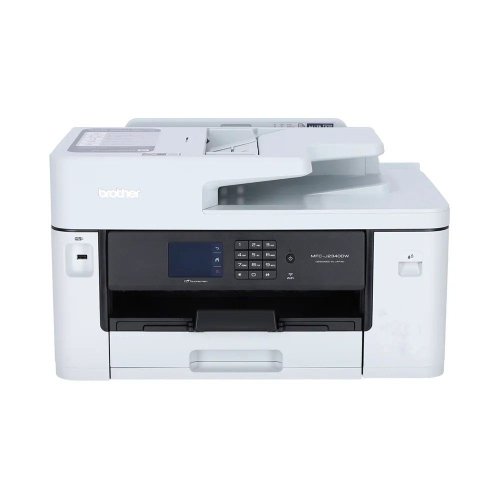
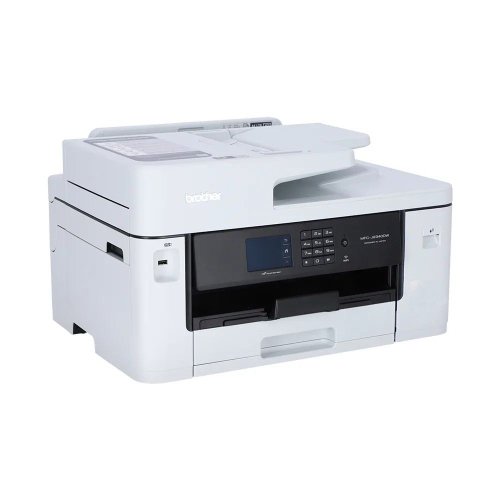
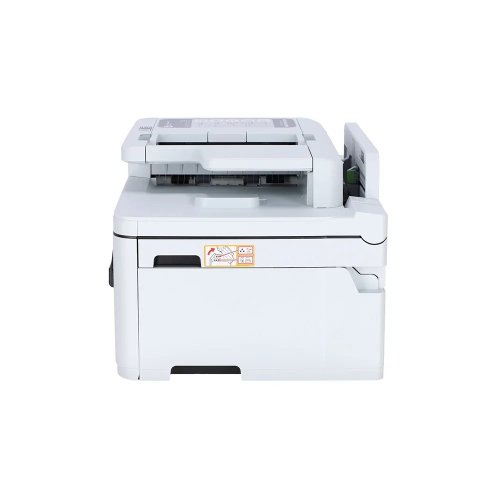
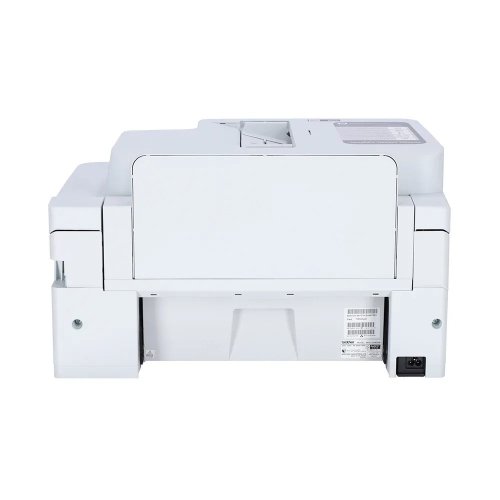
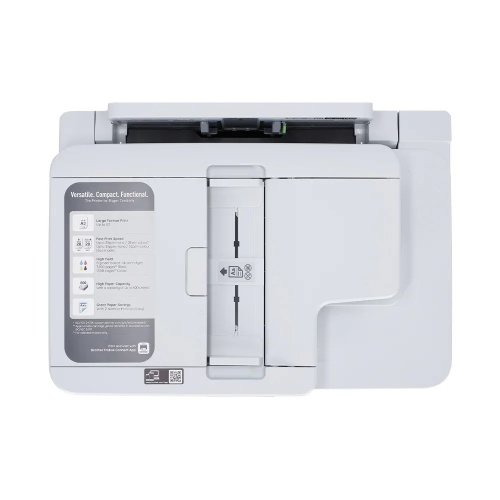
Brother MFC-J2340DW A3 Inkjet Printer
Save: 2020৳ (7%)


Brother MFC-J2340DW A3 Inkjet Printer
- Stock: In Stock
- Model: MFC-J2340DW
- Product id: 30979
28,900৳
30,920৳
Ex Tax: 28,900৳
Print Speed Up to 28.0 (Mono) / 28.0 (Color) ipm
Resolution: Up to 1200 × 4800 dpi
Enlarge/ Reduce: 25% to 400% (in increments of 1%)
Power: 220-240V AC 50/60Hz
Chat Through
Quick Compare
| Product Details | ||||
| Product | Brother MFC-J2340DW A3 Inkjet Printer | Canon Pixma G4010 All in One Wireless Ink Tank Printer | HP ScanJet Pro 2600 f1 Scanner with ADF | EPSON TM-U220B Dot Martrix POS Printer, 1YW #C31C514676 |
| Image |  |  |  |  |
| Price | | | | |
| Model | MFC-J2340DW | Canon Pixma G4010 | ScanJet Pro 2600 f1 | TM-U220B |
| Brand | BROTHER | CANON | Hp | EPSON |
| Availability | In Stock | In Stock | In Stock | In Stock |
| Rating | Based on 0 reviews. | Based on 0 reviews. | Based on 0 reviews. | Based on 0 reviews. |
| Summary | Boost Office Productivity with the Brother MFC-J2340DW A3 Inkjet Printer Finding a reliable printing solution that balances versatile paper handling with economical performance is essential for modern offices, growing businesses, and creative studios in Bangladesh. The Brother MFC-J2340DW A3 Inkjet Printer stands out as a powerful multi-function device engineered to manage high-volume document workflows with ease. Whether you operate a bustling corporate office in Dhaka, an architectural firm requiring large-format drafts, or an educational institution managing daily paperwork, this machine delivers professional output while addressing common operational hurdles such as paper jams, slow print speeds, and high ink expenses.Advanced Performance and Versatile A3 Capabilities Modern businesses frequently need to transition between standard documents and oversized presentations or spreadsheets. The Brother MFC-J2340DW provides comprehensive support for various paper sizes up to A3, allowing professionals to print blueprints, ledger reports, and marketing materials directly in-house without outsourcing. Featuring a rapid print speed of up to 28.0 images per minute for both monochrome and color documents, along with a crisp print resolution of up to 1200 by 4800 dpi, every project emerges with sharp text and vibrant visuals. Automatic duplex printing further cuts paper consumption in half, supporting sustainable office practices while lowering operational costs.Seamless Connectivity and Smart Workflow Integration In today's fast-paced digital environment, cumbersome cable setups slow down productivity. This printer features built-in Wi-Fi, Wi-Fi Direct, and high-speed USB 2.0 connectivity, enabling seamless sharing across multiple users and mobile devices. Office workers can effortlessly print from smartphones, tablets, or laptops from anywhere in the workspace. Furthermore, advanced scanning features allow users to scan directly to email, network folders, OCR software, and Microsoft Office formats. At Creatus, we ensure our clients receive authentic hardware backed by reliable guidance to optimize their daily document management workflows.Reliability and Trust for Bangladeshi Buyers Investing in office hardware requires careful consideration of local support, warranty validity, and genuine consumable availability. Counterfeit cartridges and unreliable after-sales service remain significant concerns for online shoppers in Bangladesh. Creatus bridges this trust deficit by offering verified genuine office equipment accompanied by official manufacturer warranties. Operating smoothly on standard 220-240V power supplies with energy-efficient sleep modes, this printer is perfectly tailored for local electrical conditions. Choosing Creatus ensures that your business investment is protected, backed by transparent pricing, secure delivery, and expert customer service.FAQs What is the official price of the Brother MFC-J2340DW printer in Bangladesh? The price may vary slightly based on market demand, import duties, and promotional offers. You can check the current stock status and best market price directly on our website.Does this printer support direct A3 size scanning and printing? Yes, the Brother MFC-J2340DW fully supports both A3 printing and scanning through its robust automatic document feeder and flatbed glass configuration.What kind of warranty is included with this purchase? This product comes with a 1-year limited warranty. Please note that adapters and power cables are excluded from warranty coverage, and retaining the original box is mandatory for any claims.Can I connect and print wirelessly from my smartphone? Yes, featuring built-in Wi-Fi and Wi-Fi Direct capabilities, you can easily connect your mobile devices and laptops to print and scan wirelessly without needing a direct router connection.Are replacement ink cartridges easily available in Bangladesh? Yes, the printer utilizes LC472XL high-yield cartridges (Black, Cyan, Magenta, Yellow), which are widely available through authorized channels and reliable platforms like Creatus... | SpecificationPrinting FeaturesPrint Speed Speed PPM black : 8.8ipm Speed PPM color : 5.0ipmResolution 4800 x 1200dpiPrint Technology Multi Function Color Ink PrinterDuty cycle (monthly) 1500Display 2 Line LCD DisplayPaper HandlingSizes Print Paper Size : A4, A5, B5, Letter, Legal, Envelopes (DL, COM10), Square, Business Card Scan Paper Size : A4, Letter Copy Paper Size : A4, LetterTypes Plain Paper, Photo Paper Plus Glossy II (PP-201), Photo Paper Plus semi-gloss (SG-201), Glossy Photo Paper, Matte Photo Paper (MP-101), Photo Paper Plus Glossy II (PP-208)Number of Paper Tray(s) 1Monthly Print Volume 1500 PagesCopying FeaturesCopy Speed 8.0ipm (B), 2.5ipm (C)Interface USB 2.0 Hi-SpeedScan FeaturesBit depth Grayscale : 16 / 8-bit Colour : 48 / 24-bit (RGB each 16 / 8-bit)Scan Technology CIS (Contact Image Sensor)Resolution 600 x 1200dpiSpeed Grayscale : 1.5ms/line (300dpi) Colour : 3.5ms/line (300dpi)Max Document Size Flatbed : A4 / Letter (216 x 297mm) ADF : A4 / Letter / LegalPhysical SpecificationColor BlackDimensions (W x D x H) 445 x 197 x 330mmWeight 7.3KgFaxModem speed: 33.6kbpsResolution: 200 x 200dpiWarranty InformationWarranty 01 YearSuppliesCartridge/ Toner Model No. GI-790 Black (6000 Pages), GI-790 Cyan, Magenta, Yellow (7000 Pages)Canon Pixma G4010 All in One Wireless Ink Tank Printer Price in BD Canon Pixma G4010 Printer feature Canon’s Genuine Refillable Ink Supply System, capable of volume printing up to 6,000 pages and 7,000 pages from a single set of black and color (cyan/magenta/yellow) ink bottles respectively. This drastically brings color document print cost down. The front facing integrated transparent ink tank design makes it easy to check the remaining ink levels. Topping up is now a quick and mess-free task simply by opening the ink bottle and pouring ink into the ink tank. The utilization of hybrid ink system and FINE print head guarantees a stable and reliable high quality printing performance, realizing prints with crisp, sharp black text and vibrant colors to ensure excellence for both document and photo printing. A wide array of mobile printing technologies brings extra convenience to users to print directly from smart phones and tablets, which are now handy tools for checking emails, photos, documents or researching on the internet. It allows users to scan directly to iOS or Android mobile devices via a Wi-Fi wireless network, and supports direct printing of photos and documents from mobile devices as well as remote cloud printing – all without the need of a computer. The new Canon Pixma G4010 Printer feature a built-in Wi-Fi 802.11b/g/n wireless network for network print/scan. Upon simple network setup in just a few easy steps, high quality and high-speed printing can be shared among multiple computers. Users can also enjoy the flexibility of working from laptop and being accessible to the printer’s function with the wireless network. The new printers feature a built-in Wi-Fi 802.11b/g/n wireless network for network print/scan. Upon simple network setup in just a few easy steps, high quality and high-speed printing can be shared among multiple computers. Users can also enjoy the flexibility of working from laptop and being accessible to the printer’s function with the wireless network.This All rounder daily using product comes with 01 year warranty facility. Which Canon tank printer is best? If you are looking for a printer that will not cost you too much and not demand too much maintenance in the long run, then ink tank printers are the way to go. These printers cost more than inkjet printers, but in the long run, it is durable, cost-effective and easy to use. Listed here are some of the best ink tank printers available in the Indian market. Most of these printers also have Wi-Fi connectivity built-in, so if you're in the market for the best Wi-Fi-enabled ink-tank printer, look no further. As a buyer, this wide range of ink tank printers and a little price difference between them can confuse you, especially if you are looking to buy your first-ever printer. What are the benefits of an ink tank printer? When it comes to printers, ink tank printers are highly affordable and allow you to avoid spending too much money on a printer. The cost of printing is low and the printing speed is decent enough for home and small office needs. Is it easy to maintain an ink tank printer? Yes, ink tank printers are physically easy to maintain and the maintenance cost is also not very high. What are the popular types of ink tank printers available online? You can find ink tank printers in both monochrome and coloured variants. So, you can easily shop as per your needs. Are ink tank printers quick in operation?The speed of an ink tank printer depends on the model that you are buying for your home or office needs. Usually, an ink tank printer works slower than a laser printer. But, you may find something highly efficient too that will work in a perfect manner for your needs. Canon Pixma G4010 Printer Review A compact, feature rich, robust and reliable printer with 'okay' printing speed. It's easy to set it up by yourself. I'm impressed with the print quality and color, on both plain white sheet and on glossy photo paper. The only negative I found on this device is the noise, but there is a 'quiet mode' on the PC app which almost solves the issue. Highly recommended if you are looking for a budget printer for low-volume home use. .. | HP ScanJet Pro 2600 f1 Scanner with ADFThe HP ScanJet Pro 2600 f1 Scanner with ADF is a powerful and efficient scanning solution designed for fast-paced office environments and businesses that require reliable document digitization. Featuring both flatbed and ADF (Automatic Document Feeder) capabilities, this scanner combines flexibility, speed, and precision in a compact form. Equipped with Contact Image Sensor (CIS) scanning technology, the ScanJet Pro 2600 f1 delivers impressive scan resolutions up to 1200 x 1200 dpi for flatbed scanning and 600 x 600 dpi for ADF scanning. It supports 24-bit external and 48-bit internal color depth, ensuring sharp, vivid image reproduction and accurate text scanning. The built-in 60-sheet ADF supports single-pass duplex scanning, making it ideal for high-volume workflows. With scan speeds of up to 25 pages per minute (ppm) or 50 images per minute (ipm) at 300 dpi in color, grayscale, or black & white, it enhances productivity and reduces turnaround time for scanning large batches. Designed for versatility, the ScanJet Pro 2600 f1 accommodates a wide range of document sizes. The flatbed supports documents up to 216 x 297 mm (A4), while the ADF can handle documents up to 216 x 3100 mm, and as small as 89 x 148 mm, making it suitable for everything from ID cards to long legal documents. The scanner includes USB 2.0 connectivity, ensuring easy integration with your workstation. Powered by a 666 MHz processor and 256 MB of memory, it ensures smooth operation and fast processing of complex scan jobs. Compact in size with dimensions of 491.5 x 325.4 x 133.3 mm and a weight of 5.4 kg, this sleek white scanner is easy to place in any office setup. Backed by a 1-year warranty, the HP ScanJet Pro 2600 f1 is a dependable choice for professional-grade scanning... | Epson TM-U220B Dot Matrix POS Printer #C31C514676The Epson TM-U220B Dot Matrix POS Printer (C31C514676) is a durable and reliable receipt printer designed for retail, hospitality, and business environments that require high-quality impact printing. Known for its speed and efficiency, this printer supports multiple paper widths and is ideal for printing receipts, orders, and transaction records. With its robust dot matrix technology, it performs consistently even in hot or humid conditions, making it a trusted choice for restaurants and retail stores. Easy paper loading and reliable operation help ensure smooth business transactions. Backed by a 1-year warranty, the Epson TM-U220B is a dependable POS solution.Main Features in Epson TM-U220B Dot Matrix POS Printer #C31C514676High-performance dot matrix receipt printerIdeal for retail, hospitality, and restaurantsSupports multiple paper widths for flexibilityFast, reliable printing with excellent clarityRobust design for long-term daily useEasy paper loading for smooth operation1-year official Epson warrantyFeatures and BenefitsReliable Printing: Consistent performance for receipts and orders.Durable Build: Withstands heavy daily use in demanding environments.Versatile Usage: Supports multiple paper sizes for various applications.Trusted Technology: Impact printing ensures clear output even on carbon copies.Business Efficiency: Designed for restaurants, shops, and POS systems.Why Choose Epson TM-U220B Dot Matrix POS Printer #C31C514676?The Epson TM-U220B is the perfect choice for businesses needing a dependable dot matrix POS printer that delivers durability, versatility, and cost-effective operation.Why Buy from Creatus Computer?Creatus Computer provides genuine Epson printers with official warranty, best prices in Bangladesh, fast delivery, and expert after-sales support you can trust.FAQQ1: What type of printer is the Epson TM-U220B?It is a dot matrix POS receipt printer.Q2: Can it handle carbon copy printing?Yes, its impact technology allows printing on multi-part forms.Q3: Where is this printer commonly used?It is widely used in restaurants, retail shops, and business counters... |
Related Product


