
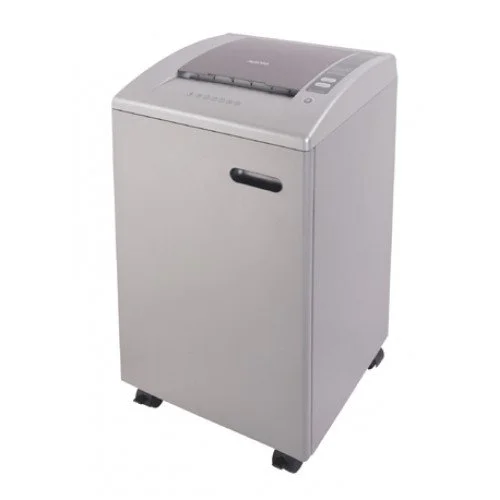
Aurora AS1540CD Paper Shredder
Out Of Stock
Aurora AS1540CD Paper Shredder
- Stock: Out Of Stock
- Model: Model-1126
- Product id: 16252
73,000৳
Ex Tax: 73,000৳
- Shred Size: 2 x 12mm
- Bin Size: 50.8 Litre
- Security Level: P5
Chat Through
Quick Compare
| Product Details | ||||
| Product | Aurora AS1540CD Paper Shredder | HP ScanJet Pro N4000 snw1 Wi-Fi Sheet Fed Document Scanner | ViewSonic LX60HD 630-Lumens FHD Smart LED Projector | Epson L1300 ITS Low Cost Printer |
| Image |  |
 |
 |
 |
| Price | 73,000৳ | |
|
|
| Model | Model-1126 | HP ScanJet Pro N4000 snw1 | LX60HD | Model-1169 |
| Brand | Hp | VIEW SONIC | EPSON | |
| Availability | Out Of Stock | In Stock | In Stock | In Stock |
| Rating | Based on 0 reviews. |
Based on 0 reviews. |
Based on 0 reviews. |
Based on 0 reviews. |
| Summary | 15 sheet micro cut shredder Shred size 2 x 12mm Security Level P5 50.8 Litre removable waste bin Auto Reverse Destroys CDs & credit cards Castors for easy movement 60 minute duty cycle .. | HP ScanJet Pro N4000 snw1 Wi-Fi Sheet Fed Document Scanner In today’s fast-paced business environment in Bangladesh, efficient document management is no longer optional—it is essential. Offices, banks, educational institutions, and corporate setups handle a large volume of paperwork every day. The HP ScanJet Pro N4000 snw1 Wi-Fi Sheet Fed Document Scanner is designed to simplify and speed up document digitization with professional-grade performance and reliability.If you are looking for a high-speed, network-enabled scanner that can handle heavy workloads without compromising quality, this model is an excellent choice. At creatus bd, you can find this powerful HP scanner designed to meet the real needs of Bangladeshi businesses and professionals. Designed for Modern Office Needs in Bangladesh Many offices in Bangladesh still rely heavily on paper documents, which can create challenges in storage, retrieval, and security. Manual document handling is time-consuming and increases the risk of loss or damage. The HP ScanJet Pro N4000 snw1 solves these issues by enabling fast and efficient digital conversion of documents. This scanner is especially useful for: Corporate offices managing large volumes of files Banks and financial institutions handling sensitive documents Educational institutions digitizing records Small and medium businesses improving workflow efficiency High-Speed Scanning for Maximum Productivity One of the key strengths of this scanner is its impressive speed. With scanning speeds of up to 40 pages per minute (ppm) and 80 images per minute (ipm), it ensures that large batches of documents are processed quickly.This is particularly beneficial in busy office environments in Bangladesh where time is critical. Employees can complete scanning tasks faster, allowing them to focus on more important responsibilities. Wi-Fi Connectivity for Flexible Workflows Modern workplaces demand flexibility, and the HP ScanJet Pro N4000 snw1 delivers exactly that with built-in Wi-Fi connectivity. Users can scan documents wirelessly and share them across multiple devices or networks.This feature is highly useful for offices with multiple users, enabling seamless collaboration without the need for physical connections. It also supports LAN and USB connectivity, giving you multiple options for integration. Duplex Scanning for Time Efficiency Handling double-sided documents manually can slow down workflow. This scanner supports automatic duplex scanning, allowing both sides of a document to be scanned simultaneously.This feature not only saves time but also increases efficiency, especially when dealing with contracts, reports, and official documents commonly used in Bangladesh. Automatic Document Feeder for Bulk Scanning The 50-sheet Automatic Document Feeder (ADF) allows users to scan multiple pages in one go without manual intervention. This is ideal for bulk scanning tasks in offices and institutions.It reduces the need for constant supervision and ensures a smooth scanning process, even during high-volume workloads. Reliable Performance with High Duty Cycle The HP ScanJet Pro N4000 snw1 is built for durability and consistent performance. With a daily duty cycle of up to 4000 pages, it can handle heavy usage without compromising reliability.This makes it a suitable choice for organizations in Bangladesh that require continuous document processing on a daily basis. Advanced Scan Quality and Accuracy Equipped with CMOS CIS technology and a resolution of 600 x 600 dpi, this scanner delivers clear and accurate digital copies. Whether you are scanning text documents, images, or business cards, the output quality remains consistent.This level of precision is essential for professional environments where document clarity is critical. Supports Various Document Types The HP ScanJet Pro N4000 snw1 is highly versatile and can handle a wide range of document types, including: Standard paper documents Business cards Bank checks Plastic cards Long documents up to 122 inches This flexibility makes it suitable for different industries and use cases across Bangladesh. Compact Design for Space Efficiency Office space is often limited, especially in urban areas. This scanner features a compact and lightweight design, making it easy to fit into any workspace without clutter.Despite its small size, it delivers powerful performance, making it a practical choice for both small offices and large organizations. Easy Setup and User-Friendly Operation Not all users in Bangladesh are highly technical, so ease of use is an important factor. The HP ScanJet Pro N4000 snw1 is designed with user-friendly software and simple controls, making it accessible for beginners as well as professionals.The included drivers and utilities ensure smooth integration with Windows systems, allowing quick setup and hassle-free operation. Value for Money for Bangladeshi Buyers When investing in office equipment, Bangladeshi buyers look for durability, performance, and long-term value. This scanner offers all three, making it a cost-effective solution for businesses.Its high speed, reliability, and low maintenance requirements ensure that you get maximum return on your investment over time. Trusted Online Purchase Experience Buying electronics online in Bangladesh often comes with concerns about authenticity and after-sales support. At creatus bd, customers can confidently purchase genuine HP products with proper warranty coverage.The platform ensures reliable service, competitive pricing, and fast delivery, making it a trusted choice for office equipment. Frequently Asked Questions (FAQs) 1. What is the price of HP ScanJet Pro N4000 snw1 in Bangladesh? The price typically starts from around Tk 73,000 in Bangladesh, but it may vary based on availability and offers. Check creatus bd for the latest price. 2. Is this scanner suitable for heavy office use? Yes, with a duty cycle of up to 4000 pages per day and fast scanning speed, it is ideal for heavy office and business use. 3. Does the scanner come with warranty in Bangladesh? Yes, the HP ScanJet Pro N4000 snw1 comes with a 1-year warranty when purchased from authorized sellers, ensuring reliability and support... | ViewSonic LX60HD 630-Lumens FHD Smart LED ProjectorThe ViewSonic LX60HD 630-Lumens FHD Smart LED Projector is a high-performance projector designed for both home and professional use. With a 1920x1080 Full HD resolution, it delivers sharp and vibrant visuals, making it ideal for movies, presentations, and gaming. The projector offers 630 ANSI lumens of brightness, ensuring clear and bright images even in moderately lit environments. Its 4200:1 contrast ratio enhances picture quality by providing deep blacks and vivid colors, further improving the viewing experience. Equipped with dual 5W cube speakers, the LX60HD produces clear and immersive audio, eliminating the need for external speakers in many situations. Additionally, its built-in WiFi (5GHz) allows seamless wireless connectivity, making streaming content and connecting devices easier than ever. The projector features an HDMI 1.4 port with HDCP 1.4 support, ensuring compatibility with various multimedia devices, including laptops, gaming consoles, and streaming devices. It also includes two USB 2.0 ports, allowing users to play content directly from USB drives. Designed for efficiency, the ViewSonic LX60HD operates within a temperature range of 0~35°C, making it reliable for long hours of usage. Its power supply supports 100-240V (50/60Hz), ensuring compatibility with different power sources. The projector is compact, measuring 228x227x159mm, making it easy to place or mount in different setups. With a 2-year warranty, the ViewSonic LX60HD ensures long-lasting performance and reliability. Whether for home entertainment, office presentations, or educational use, this smart LED projector offers exceptional picture quality, strong connectivity, and user-friendly features, making it an excellent choice for anyone seeking a high-quality projection solution... | Specification General: Brand Epson Model L1300 Functions Print Only Printer Type Single Function Color Ink Tank Printer Part No C11CD81501 Technical Information: Display No Ink Tank Yes Print Performance: Output Color Color Print Speed (Black) 30ppm Print Speed (Color) 17ppm Print Resolution (Pixel) 5760 x 1440dpi Duplex Print Manual Duty Cycle up to (Yield) 30,000 Pages Paper Information: Print Paper Size A3+, A3, B4, A4, A5, A6, B5, 10x15cm (4×6), 13x18cm (5×7 Inch), 16:9 wide size, Letter, Legal, Half Letter (5.5×8.5 Inch), 9x13cm (3.5×5 Inch),13x20cm(5×8 Inch), 20x25cm(8×10 Inch), Envelopes: 10(4.125×9.5 Inch),DL(110x220mm), C4 (229x324mm, C6(114x162mm) Paper Type Plain Paper, Envelopes Input Tray 100 Sheets Output Tray 40 Sheets Physical Description: Body Color Black Dimensions 705 x 215 x 322mm Weight (Kg) 12.2Kg Software: Supported Operating System Windows 7, 8, 8.1, 10, Vista, XP, Mac OS 10.5+ Warranty: Warranty 1 year Connectivity: Interface (Built-in) USB Additional Info: Consumable Dye Based, Epson Genuine Inks: Black-T6641 (7,100 Pages Yield – 2 bottles of black ink), Cyan- T6642 (5,700 Pages Composite Yield), Magenta- T6643 (5,700 Pages Composite Yield), Yellow- T6644 (5,700 Pages Composite Yield) Power Source/ Power Consumption AC 220 – 240V Specialty With the L1300, you have the option to print larger documents up to A3+ size. This opens up possibilities for superior presentations of detailed CAD drawings, floor plans, business reports and charts. High-capacity integrated ink tanks and highly affordable genuine ink bottles. With a bundled starter kit of 5 bottles of Epson Ink, the L1300 yields up to 7,100 pages. Designed for continuous printing performance, Epson’s renowned Micro Piezo™ printhead is not only highly reliable in operation, it also delivers an astoundingly high resolution of 5760dpi. When paired with genuine Epson formulated inks, the L1300 delivers exceptionally high-quality prints for all your business and creative needs. Epson L1300 ITS Low Cost Printer Epson L1300 ITS Low Cost Printer compact 4-colour A3+ printer for cost-conscious users, the L1300 is built around a high-capacity ink tank system that stretches to 7,500 black pages without a refill1. With minimal intervention, the L1300 delivers cost-effective and hassle-free printing of advertising materials, CAD drawings, graphics and reports, perfect for corporate office, retail and education environments. Ultra-low-cost printing Take advantage of ultra-low cost printing, up to A3+ size, for all kinds of documents with this 4-colour ink tank system printer. Ultra-low cost printing An integrated ultra-high-capacity ink tank system makes the L1300 perfect for heavy use where achieving the lowest cost per page is all important. Ideal for small offices needing to produce lengthy reports, advertising materials or CAD drawings, the L1300 comes with five 70ml ink bottles. Increases productivity The L1300's integrated ink tank system makes it refill-free for up to 7,500 pages in black and 6,500 pages in colour. When it's finally time for a change, there's no need for mess; with fast ink top-up technology, clear labelling and a drip-free nozzle, to refill the L1300 is a simple, quick and clean process. Reliable results With a purpose-built ink tank, there's no need to risk costly downtime or poor quality print-outs that can result from using third-party ink tank systems. Fully integrated into the printer, the L1300's continuous ink ensures trouble-free mono and colour printing in up to A3+. Fast business printing Inside the L1300 is Epson's Micro Piezo technology and genuine Epson ink, which together deliver quality print-outs. It benefits from print speeds of up to 17 pages per minute (ppm) in colour and 30 ppm in black, and ISO print speeds of 5.5 ppm in colour and 15 ppm in black. Key Features Value for money: Ultra-low-cost per page Peace of mind: Covered by Epson's warranty Epson quality: Purpose-built, refillable ink tank A3+ printing: Epson's first A3+ 4-colour ITS printer User-friendly: Hassle-free with simple set-up How to Maintain Printers? Anytime you need to open a printer to maintain, turn off its power and keep your hands away from hot fusers and moving parts within the printer. It will check the unnecessary damage to both you as well as your printer. Here are some maintenance tips that can help you take optimum care of your computer: - Stay Safe Each time you require opening the computer for maintenance, turn off its power. Keep your hands away from hot fusers and moving within the printer. It will ensure that neither you or your printer suffer from any type of damage. Clean Dust and Debris from The Printer The build-up of toner, dust and other debris within the printer might lead to jams, causing streaks of ink to appear on papers. A proper fix is to remove particles using a small vacuum. It is preferred over use of canned air dusters since it removes dust instead of spraying it around its interiors. You can still go further by using a cotton swab and pure water to wash and cleanse the ink cartridges. Most of the manufacturers offer specific instructions either in their printer manual or online. Make it a point to read them since there are some parts of the cartridge which you didn’t gauze. Fix Mechanical Errors Carefully Like other peripherals, your printer will last longer if you take its proper care. A mistakenly resolved paper jam might lead to printing problems in the future. Instead of venting your frustration on the printer, use the instructions which come with the printer to find out the best way to fix a jam on your specific model. Usually, the most common practice is to utilise both hands in order to pull out the jammed paper slowly. It will help you ensure that there is no internal damage to the printer. You can also check jams by ensuring that the paper you load within the printer isn’t torn, stuck together and dog eared and that the tray isn’t overfilled. Buy A Maintenance Kit If you are willing to invest a little amount of money to extend your printer’s lifespan, buy a maintenance kit from the printer’s manufacturer when the original parts start showing signs of wear out. The kit will include a wide range of maintenance products ranging from cleaning supplies to changeable printer parts like rollers, which when dirty or worn out are the major cause of printer jams. No printer is flawless and there can be occasional jams, errors and smudges. However, easy printer maintenance it is possible to minimise the recurrence of these issues and ensure a better printing experience. Related Printer Brand Canon Printers POS Printers HP Printers Level Printers Ricoh Printers Zebra Printers Honeywell Printers Brother Printers Epson L1300 Its Low Cost Printer Review Buy this Epson L1300 Photo Printer and take advantage of ultra-low cost printing, up to A3+ size, for all types of documents. It features Micro Piezo Technology and genuine Epson ink which together deliver quality print outs. Design: Epson L1300 Low Cost Photo Printer has 12.2 kg weight and 215 × 322 × 705(H ×D × W) mm dimensions. It comes with rear feed tray which accepts a wide variety of printing media including thick paper, photo paper, labels, envelopes and more that allow you to accomplish all sorts of printing jobs with ease. Epson’s original ink tank system has been designed for smooth, no-mess operation in corporate and SOHO environment. It has Print Performance: Epson L1300 Low Cost Printer comes with an advanced print head to achieve fast print speed of up to produce 15ipm. Designed for a flawless printing performance, Epson’s renowned Micro Piezo Printhead is not only highly reliable in operation, it also delivers an remarkably high resolution of 5760dpi. When paired with Epson formulated ink, the Epson L1300 Low Cost Photo Printer delivers exceptionally high quality prints for all your business and creative needs. Epson genuine ink bottles are sealed properly to ensure the purity of its contents and formulated to deliver an outstanding print quality Connectivity: Epson L1300 Low Cost Printer comes with a standard USB 2.0 Hi-speed interface which allows you to print directly from your laptop or USB drive. Any Other Features: With this Epson L1300 Photo Printer, you will get a warranty coverage of 1 year or 30,000 prints whichever comes first, for maximum value from your printer and freedom from all types of maintenance worries. Some other additional features of the printer include 3pl minimum ink droplet volume, double sided printing, collate, both bi-directional and uni-directional printing, approx. 20W power consumption during normal mode and approx. 6.9 W in standby mode. .. |
Related Product


Recently Viewed

