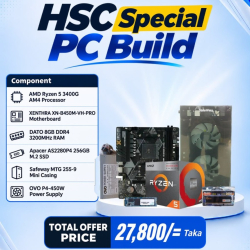
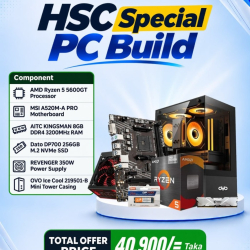
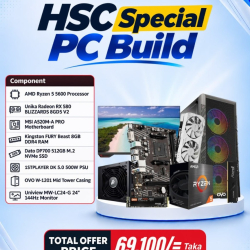
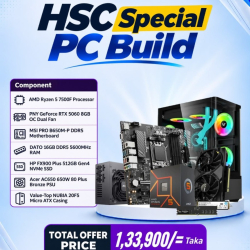
Best BUDGET PC Shop in Bangladesh
We are the best BUDGET PC shop in Bangladesh, and we have the best prices around. We have everything you need to build or upgrade your PC, including
motherboards,
processors,
graphics cards,
Desktop Ram,
Laptop Ram,
cases and more. So if you’re looking for the best deals on PCs and computer parts, shop at Creatus Computer.
Creatus Computer has always prioritized its customers and has launched e-commerce shops in addition to physical stores to ensure better customer service. The goal was to meet the needs of more customers in the shortest possible time. Since then, we have topped the list as the best e-commerce shop in Bangladesh. Our website has a comprehensive search option to find the desired product. Our website features a unique
PC maker so you can create a
custom PC with your desired components.
Budget PC Price in Bangladesh
The evolution of budget PC prices in Bangladesh mirrors the country's technological progress. In the early 2000s, personal computers were scarce and considered luxury items, largely due to limited supply and high import costs. As the demand for technology grew, local assembly and international partnerships began to flourish, making PCs more accessible to the general population. Over the years, improved infrastructure, government initiatives, and increased competition among brands further contributed to the affordability and availability of budget PCs, enabling more people to embrace digital technology and spurring the growth of the IT industry in Bangladesh.
Best Budget PC Build For Gaming
Building the best budget PC for gaming requires a balance between performance and cost. Start with a mid-range CPU, like AMD's Ryzen 5 or Intel's Core i3, paired with a budget-friendly GPU, such as the NVIDIA GTX 1650 or AMD Radeon RX 570. Opt for 8GB or 16GB of DDR4 RAM for smooth multitasking and gaming. A 500GB SSD offers faster load times, while a reliable power supply ensures stability. Choose a case with good airflow to keep components cool. This setup delivers solid performance in popular games at 1080p resolution, offering an excellent gaming experience without overspending.
Top Popular BUDGET PC Brands
There are so many famous BUDGET PC brands in Bangladesh that come with a series of BUDGET PC for their customers. Creatus Computer collection includes renowned brands such as Corsair iCUE PC, Intel PC and Ryzen PC.
Low Budget PC Build BD
Building a low-budget PC in Bangladesh has become increasingly popular, driven by the need for affordable technology. Enthusiasts and students often seek cost-effective components to assemble a functional PC for tasks like browsing, studying, and light gaming. Local markets offer a variety of options, including budget-friendly CPUs, motherboards, and storage solutions, often sourced from global brands and local suppliers. By carefully selecting and balancing these components, it's possible to create a reliable PC that meets basic computing needs without breaking the bank. This trend reflects the growing DIY culture and demand for accessible technology in Bangladesh.
Processor Type
The processor serves as the brain of your computer, handling tasks ranging from simple web browsing to intensive gaming and content creation. In this guide, we'll explore two popular processor types from Intel and AMD that offer excellent performance without breaking the bank.
Intel Pentium Gold Series:
The Intel Pentium Gold series is a solid choice for budget-conscious users seeking reliable performance for everyday computing tasks. With dual-core or quad-core configurations and Intel's Hyper-Threading technology, Pentium Gold processors deliver smooth multitasking capabilities. They offer decent clock speeds and integrated Intel UHD Graphics, making them suitable for light gaming and multimedia tasks. Additionally, Intel Pentium Gold processors are energy-efficient, contributing to lower power consumption and quieter operation.
AMD Ryzen 3 Series:
On the AMD side, the Ryzen 3 series presents a compelling option for budget PC builders. These processors feature quad-core configurations with simultaneous multithreading (SMT) technology, effectively doubling the number of threads. This results in improved performance in multithreaded applications, such as video editing and productivity software. Ryzen 3 processors also come equipped with AMD Radeon Vega Graphics, offering decent graphics performance for casual gaming and multimedia tasks. Furthermore, AMD Ryzen 3 processors are known for their affordability and excellent value proposition, making them a popular choice among budget-conscious users.
RAM
Consider opting for either 8GB or 16GB of RAM to strike the right balance between performance and cost. With 8GB RAM, your system can handle everyday tasks smoothly, including web browsing, document editing, and light gaming. It's an ideal choice for casual users or those on a tighter budget. However, if you require more power for multitasking, content creation, or gaming, upgrading to 16GB RAM is worth considering. This additional memory ensures smoother performance and better handling of resource-intensive applications without significantly increasing your expenses. Whether you're a student, professional, or casual user, choosing between 8GB and 16GB of RAM for your budget PC depends on your specific needs and usage requirements. Both options offer solid performance and value, making them excellent choices for cost-conscious builders.
SSD
Consider upgrading to a solid-state drive (SSD) with either 256GB or 512GB of storage capacity. With a budget-friendly SSD, you can experience significant improvements in speed and responsiveness compared to traditional hard disk drives (HDDs). The 256GB option provides ample storage for operating system files, essential programs, and a modest collection of files and applications. However, if you require more storage space for games, multimedia, and larger files, opting for the 512GB SSD is a better choice. Both options offer faster boot times, quicker application launches, and smoother overall system performance, making them worthwhile investments for budget-conscious users looking to optimize their PC experience.
Trending Budget PC in Bangladesh
FAQs
Q. Is 8GB of RAM enough for gaming on a budget PC?
A.Yes, 8GB of RAM is sufficient for most budget gaming setups. However, upgrading to 16GB can provide better performance, especially in more demanding titles.
Q. Can I upgrade my RAM later if I choose 8GB initially?
A.Yes, most motherboards support RAM upgrades, allowing you to increase your system's memory capacity in the future.
Q. How does RAM affect gaming performance?
A.RAM affects gaming performance by storing game data temporarily, allowing for faster access and smoother gameplay. Insufficient RAM can lead to lag and stuttering in games.
Q. Will upgrading to 16GB of RAM improve my PC's overall speed?
A.Yes, upgrading to 16GB of RAM can improve your PC's overall speed, especially when multitasking or running resource-intensive applications.
Q. What if my budget doesn't allow for 16GB of RAM?
A.If your budget is limited, starting with 8GB of RAM is a viable option. You can always upgrade in the future as needed.