KTC Monitor in Bangladesh: Gaming, Portable and Mini LED Displays
A KTC monitor in Bangladesh now fits almost every desk, from a 600g portable screen that slips into a laptop bag to a 34-inch curved ultrawide and a Mini LED panel built for HDR. KTC designs its displays around fast IPS panels, wide colour coverage and practical stands, and the range at Creatus Computer reflects that: six models, each suited to a different kind of user.
Begin with the size and resolution you need. The H15F9 gives a laptop a second 15.6-inch Full HD screen wherever you work. The H24F7 and H27F7 bring 240Hz Full HD to fast-paced games. The H27T7P steps up to 2K QHD, the H34S5 spreads a 3440 × 1440 canvas across a 21:9 curve, and the M27E6S adds a 1,152-zone Mini LED backlight for deep contrast and bright highlights. The sections below describe each model in turn, using specifications from KTC and retailer data, so you can compare like with like.
Portable and everyday monitors
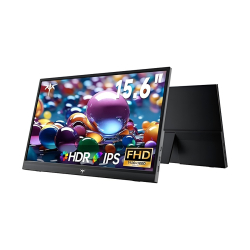
KTC H15F9 15.6 Inch Portable IPS Monitor
The KTC H15F9 is a 15.6-inch Full HD (1920 × 1080) IPS monitor that weighs about 600g with its stand and measures roughly 12mm thick, so it travels with a laptop without adding bulk. The IPS panel offers 178° viewing angles, about 141 pixels per inch for crisp text, and 300 nits of brightness, while HDR support, flicker-free backlighting and a low blue light mode make long sessions easier on the eyes. Dual USB Type-C ports carry video and power from a compatible laptop or phone, a Mini HDMI input covers consoles and older devices, and built-in speakers with an earphone jack mean there is nothing else to pack. The box includes a Mini HDMI to HDMI cable and a USB-C cable. It suits students, remote workers and anyone who wants a second screen for spreadsheets, chat windows or a handheld console.
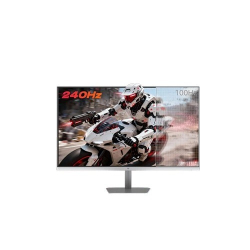
KTC H24F7 24 Inch 240Hz FHD IPS Gaming Monitor
The KTC H24F7 pairs a 24-inch Fast IPS panel at 1920 × 1080 with a 240Hz refresh rate and 1ms MPRT response, a combination aimed at shooters, racing games and other titles where motion clarity matters. Adaptive Sync keeps frames tear-free when your frame rate moves around, HDR400 adds range in bright and dark scenes, and the colour gamut reaches 116% sRGB. Low blue light mode and DC dimming keep the backlight flicker-free for longer sessions. Connections include two HDMI 2.0 inputs, DisplayPort and USB 2.0, and the tilt-adjustable stand leaves room for VESA mounting. At 24 inches and Full HD, it fits a compact desk and graphics cards that favour high frame rates over resolution.
27-inch gaming monitors
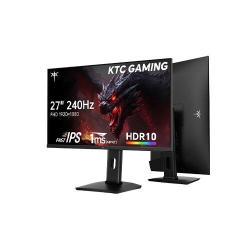
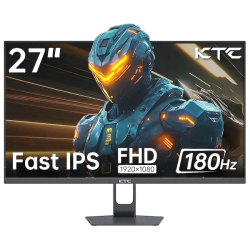
KTC H27F7 27 Inch 240Hz FHD IPS Gaming Monitor
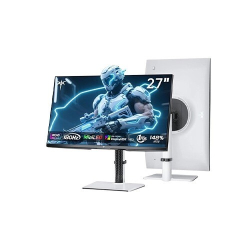
The KTC H27F7 takes the speed of the H24F7 and stretches it across a 27-inch Fast IPS screen at 1920 × 1080. A 240Hz refresh rate and 1ms MPRT response keep fast scenes clear, Adaptive Sync removes tearing, and 178° viewing angles hold colour steady from the side. The panel is rated for HDR10 at 350 nits, with 131% sRGB and 97% DCI-P3 colour, which gives games and video a richer look than a basic office screen. The stand tilts from -5° to 20°, pivots 90° either way and lifts by 130mm, and VESA 100 × 100 mounting is supported. Inputs are two HDMI 2.0 ports, one DisplayPort 1.4 and USB 2.0. Choose it when frame rate matters more than sharpness and your graphics card prefers Full HD.
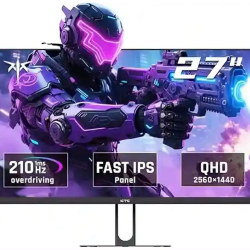
KTC H27T7P 27 Inch 2K 210Hz QHD IPS Gaming Monitor
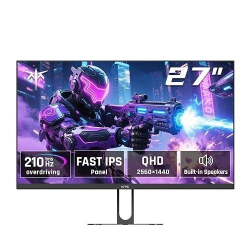
The KTC H27T7P moves up to 2K QHD (2560 × 1440) on a 27-inch Fast IPS panel, which adds noticeably finer detail in games, photos and text without giving up speed. The panel runs at 200Hz natively and can be overclocked to 210Hz, with 1ms MPRT response, HDR400 and up to 450 nits of brightness, plus 131% sRGB colour. FreeSync and G-Sync compatibility smooth out frame-rate dips. Two DisplayPort 1.4 and two HDMI 2.0 inputs make it easy to connect a PC and a console together, and built-in speakers and VESA 100 × 100 mounting are included. Use DisplayPort for the full refresh rate, since HDMI 2.0 tops out at 144Hz at this resolution. It is a strong all-rounder for players who also edit photos or work across several windows.
Premium picks: ultrawide and Mini LED
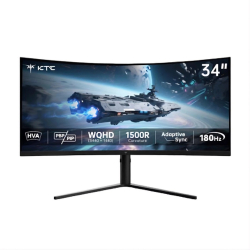
KTC H34S5 34 Inch 2K 180Hz HVA 1500R Curved Gaming Monitor
The KTC H34S5 is a 34-inch 21:9 ultrawide with a 3440 × 1440 UWQHD resolution on a 1500R curved HVA panel, built for people who want one wide canvas instead of two screens. The VA panel delivers a 4000:1 contrast ratio, so dark scenes retain depth, and colour coverage reaches 99% sRGB and 95% DCI-P3. A 180Hz refresh rate with 1ms MPRT and 3ms overdrive response keeps motion smooth, and FreeSync and G-Sync compatibility, HDR10 support and Picture-in-Picture and Picture-by-Picture modes cover gaming and multitasking alike. Use DisplayPort 1.4 for the full 180Hz; the HDMI 2.0 inputs support up to 100Hz at this resolution. The stand offers tilt, swivel and height adjustment, and a DisplayPort cable comes in the box. It suits racing and open-world games, timelines in video editors and wide spreadsheets.
KTC M27E6S 27 Inch 2K 240Hz Mini LED Fast IPS Gaming Monitor
The KTC M27E6S combines a 27-inch 2K QHD Fast IPS panel with a Mini LED backlight split into 1,152 dimming zones. Zones brighten and dim independently, which lifts contrast and lets HDR1000 content reach about 1000 nits at its peak, against roughly 450 nits for everyday SDR use. Colour coverage is 100% sRGB and 98% DCI-P3, the refresh rate is 240Hz with 3ms overdrive response, and Adaptive Sync keeps frames smooth. Zone-based backlights can show a faint halo around small bright objects on dark backgrounds, so it rewards HDR games, films and dim rooms more than flat office work. The power supply is built in, which keeps the desk free of an extra adapter. Choose it if you want the deepest contrast in the KTC range at a 1440p resolution.
How to choose a KTC monitor
Choose a KTC monitor based on screen size, refresh rate and features that match your gaming or productivity needs.
| Model | Size | Refresh Rate | Standout Feature |
|---|
| KTC H15F9 | 15.6 in | 60Hz | 600g body, USB-C video and power |
| KTC H24F7 | 24 in | 240Hz | HDR400, 116% sRGB |
| KTC H27F7 | 27 in | 240Hz | Height, tilt and pivot stand |
| KTC H27T7P | 27 in | 200Hz, 210Hz overclocked | 450 nits, built-in speakers |
| KTC H34S5 | 34 in | 180Hz | 21:9 ultrawide, PiP and PbP |
| KTC M27E6S | 27 in | 240Hz | 1,152 zones, HDR1000 |
Full HD at 24 or 27 inches suits competitive play on a modest graphics card, because it asks less of the GPU and lets the frame rate climb toward 240Hz. QHD adds detail for players who also edit or multitask, but it needs a stronger card to hold 200Hz or more. Ultrawide gives the widest field of view, and Mini LED gives the strongest contrast.
Ports decide whether you see the advertised refresh rate. On the H27T7P, HDMI 2.0 manages 144Hz at 1440p, and on the H34S5 it manages 100Hz at 3440 × 1440, so connect a PC with DisplayPort to reach the top speed. HDMI is fine for consoles and laptops. For a portable screen, check that your laptop or phone supports video over USB-C, otherwise use the Mini HDMI input.
FAQs
Which KTC monitor suits competitive shooters?
The KTC H24F7 and H27F7 both run at 240Hz with 1ms MPRT at Full HD, which keeps frame rates high on mid-range graphics cards.
Can the KTC H15F9 connect to a phone or console?
Yes. Use a USB-C port that supports video output, or the Mini HDMI input with the supplied cable for consoles and laptops.
Does the KTC H27T7P reach 200Hz over HDMI?
No. HDMI 2.0 limits it to 144Hz at 1440p, so use DisplayPort for 200Hz or the 210Hz overclock.
Is the KTC H34S5 only for gaming?
No. The 21:9 canvas, 3440 × 1440 resolution and Picture-by-Picture mode also suit video editing, spreadsheets and side-by-side windows.
What does Mini LED change on the KTC M27E6S?
Its 1,152 backlight zones dim and brighten independently, which deepens blacks and lifts HDR highlights compared with a standard edge-lit panel.
Do these monitors support wall or arm mounting?
The H24F7, H27F7 and H27T7P support VESA mounting; check each product page for the other models before buying an arm.